My son can draw into a printed comic book, but then I need a way to make another copy. His new drawing lives on paper. I want to photograph that page, bring it back into the Comic Book Creator, and print it with the speech and images together.
The photo page workflow already let me add a photograph, adjust its contrast, place speech above it, and print the book as folded sheets. The next problem showed up in the photograph itself. A page taken with a phone is rarely square to the camera. Rotating the whole image can straighten one edge, but the paper can still narrow toward the top or lean to one side.
Pick the page corners
The selected photo now has a Crop & Deskew action. It opens the photo in a dialog with four points. I drag each point to a corner of the paper I want to keep. The app maps that four-sided selection into a rectangle and saves a new image for the comic page.
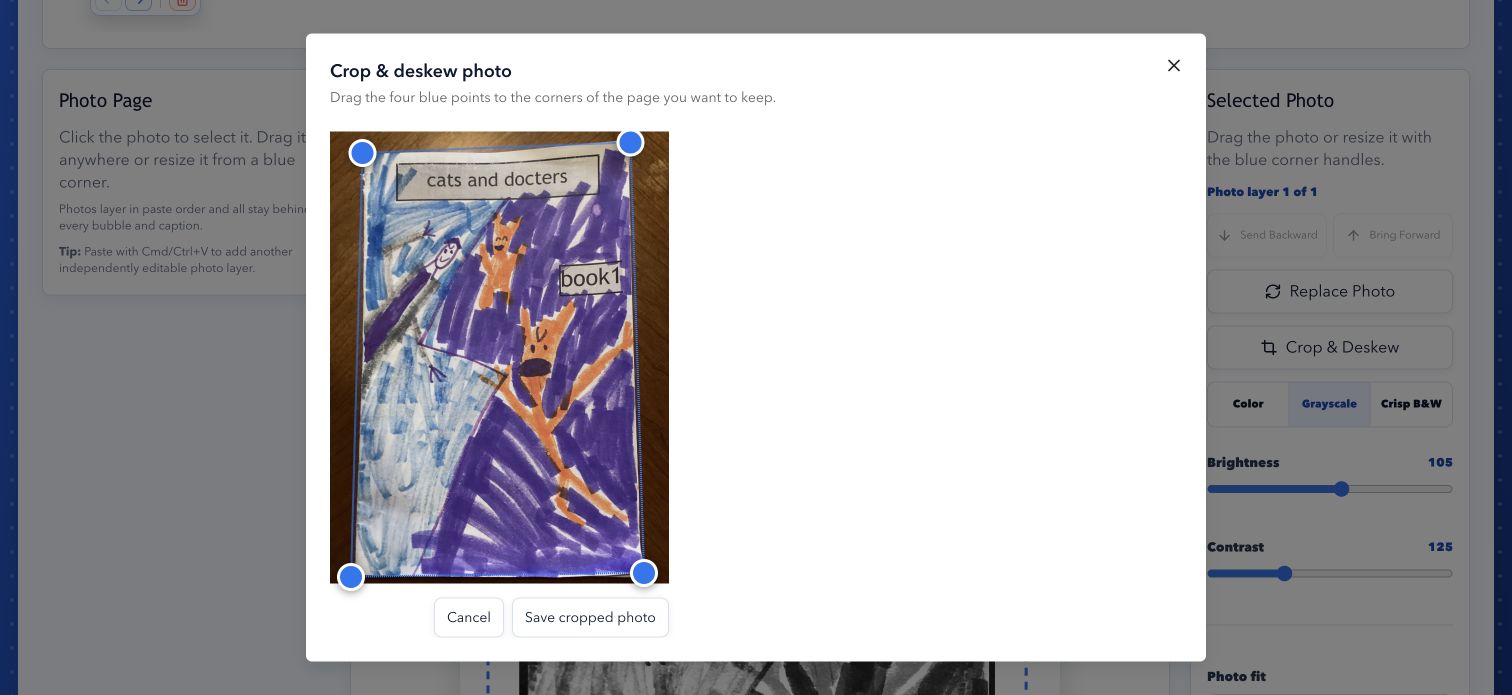
That is a more useful crop than trimming equal amounts from every side. It removes the table around the drawing and corrects the camera angle in the same step. It does not flatten a physical curl in the middle of the paper; four corners only describe the outside of the page.
My first pass had a problem: saving the corrected image replaced the photo attached to the page. The original file still existed on the server, but the editor no longer knew which file it came from. If I put one corner in the wrong place, reopening the dialog showed the already cropped result. A second crop would cut into that result again.
The page now keeps the original photo's filename and the four corner positions alongside the corrected image. When I reopen Crop & Deskew, I see the original photo with the same points selected. I can move a corner and generate a fresh result from the original, instead of stacking one correction on another. Replacing the photo with a different upload clears that crop history for the layer.
The loop is the point: print a comic, let my son draw into it, photograph the page, line up the corners, and reprint it with the speech and images together. If the first alignment is off, the correction is still editable.
- Project: Comic Book Creator
- Source: byronwall/comic-book-creator