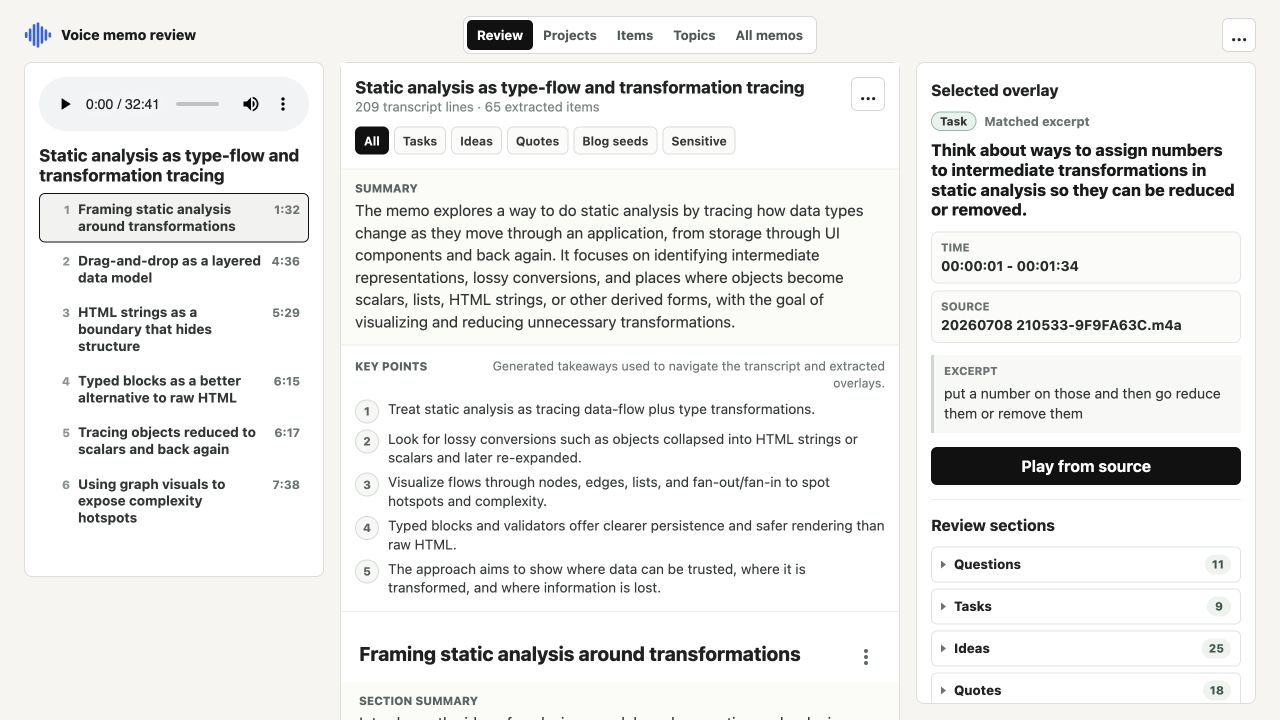
Video to Context started as a tool for screen recordings. The useful output was a context package: extracted audio, transcript files, screenshots, a contact sheet, lineage back to each source file, and an HTML report tying the pieces together.
That shape still works for videos, but it left out an obvious source of context: voice memos. I use voice memos for rough thoughts, quick design notes, and spoken drafts. I also use voiceovers on screen recordings. In both cases, the raw recording is only half useful. The transcript is what makes it searchable, skimmable, and easy to reuse in later AI analysis.
First step: stop assuming video
The original CLI treated input discovery as video-only. The first change was to generalize the source model from videos to media files. That meant adding common audio extensions such as .m4a, .caf, .mp3, .wav, .aac, and .flac, then probing each source for audio and video streams separately.
That small shift made the rest of the pipeline more honest. A file can have audio, video, both, or neither. If there is no video stream, the CLI should not try to extract frames or build a contact sheet. If there is audio, it can still extract a mono WAV and run whisper.cpp.
Make folder processing idempotent
Voice memo processing is not something I want to babysit. I want to point the tool at a folder, let it build a common output package, and then rerun it later after new memos arrive.
The CLI now writes a .v2c-manifest.json file into the output folder. The manifest records the input files, sizes, mtimes, stream metadata, and meaningful options. On the next run, the CLI compares the current inputs to the manifest:
- same files and options: print the existing outputs and skip work
- changed files or options in a managed output folder: rebuild
- unmanaged existing folder: refuse unless
--forceis provided
That turns the output folder into a stable local cache instead of a disposable build artifact.
The voice memo preset
After audio support worked, the command was still too specific:
v2c ~/Library/Mobile\ Documents/com~apple~CloudDocs/Voice\ Memos \
  -o ~/.v2c-voice-memos \
  --no-source \
  --no-frames
That is technically fine, but it is not a nice everyday interface. The final shape is:
v2c --voice-memosThe flag does the expected things:
- auto-detects likely Apple Voice Memos locations
- writes to
~/.v2c-voice-memos - skips source copies so private audio files are not duplicated
- skips frames and contact sheets
- opens
report.htmlwhen done - keeps the manifest behavior so reruns are cheap
This is the kind of single parameter that is worth adding. It is not just an alias for fewer keystrokes. It encodes the intent of the workflow. "Process my voice memos" is a different task from "process this arbitrary media folder," and the defaults should reflect that.
Debugging the real Mac path
Apple Voice Memos storage is not as simple as one universal folder. Depending on iCloud Drive, app containers, and macOS privacy settings, recordings can appear under different ~/Library locations. Some of those locations also look like they exist but cannot be read unless the terminal has Full Disk Access.
The detection logic now checks several likely paths, searches for Voice Memos-like directories under iCloud Drive, and falls back to Spotlight metadata. More importantly, it logs what it is checking. If macOS blocks access, the error says which likely paths were denied and points to the Full Disk Access fix.
That visibility mattered because an earlier version appeared to hang. It was not doing nothing. It was recursively scanning or probing files before the first useful log. The CLI now reports each slow phase: locating memos, checking tools, finding media, reading metadata, preparing whisper.cpp, extracting audio, and transcribing.
Why the preset matters
The best CLI flags are not always the most general ones. A good preset removes incidental decisions from a repeated workflow. I do not want to remember the iCloud path, output folder, privacy-safe source-copy setting, frame setting, report-opening behavior, or cache semantics every time I want transcripts.
--voice-memos makes the tool feel like the task:
v2c --voice-memosThat is the useful abstraction. The implementation still has all the details, but the interface lets me ask for the outcome directly.
- Project: Video to Context