Video to Context started with a simple promise: take a recording, extract the useful context, and leave behind files that a person or an AI agent can read later. For screen recordings that meant transcript text, screenshots, a contact sheet, and an HTML report. For voice memos it became a local workflow around Apple Voice Memos, transcription, segmentation, and generated analysis artifacts.
The latest step was making those artifacts reviewable.
The CLI can now run an OpenAI-backed analysis pass over a generated voice memo package. That pass rewrites rough transcript segments into cleaner sections, extracts excerpt-backed items, synthesizes a transcript-level summary, and writes the files that the review UI expects:
analysis/
  segments.json
  segment-analysis.jsonl
  transcript-summary.json
  review-inbox.jsonl
The Solid/Vite app in app/ reads those packages from ~/.v2c-voice-memos and turns them into a three-pane local workspace: memo library, transcript, and evidence detail.
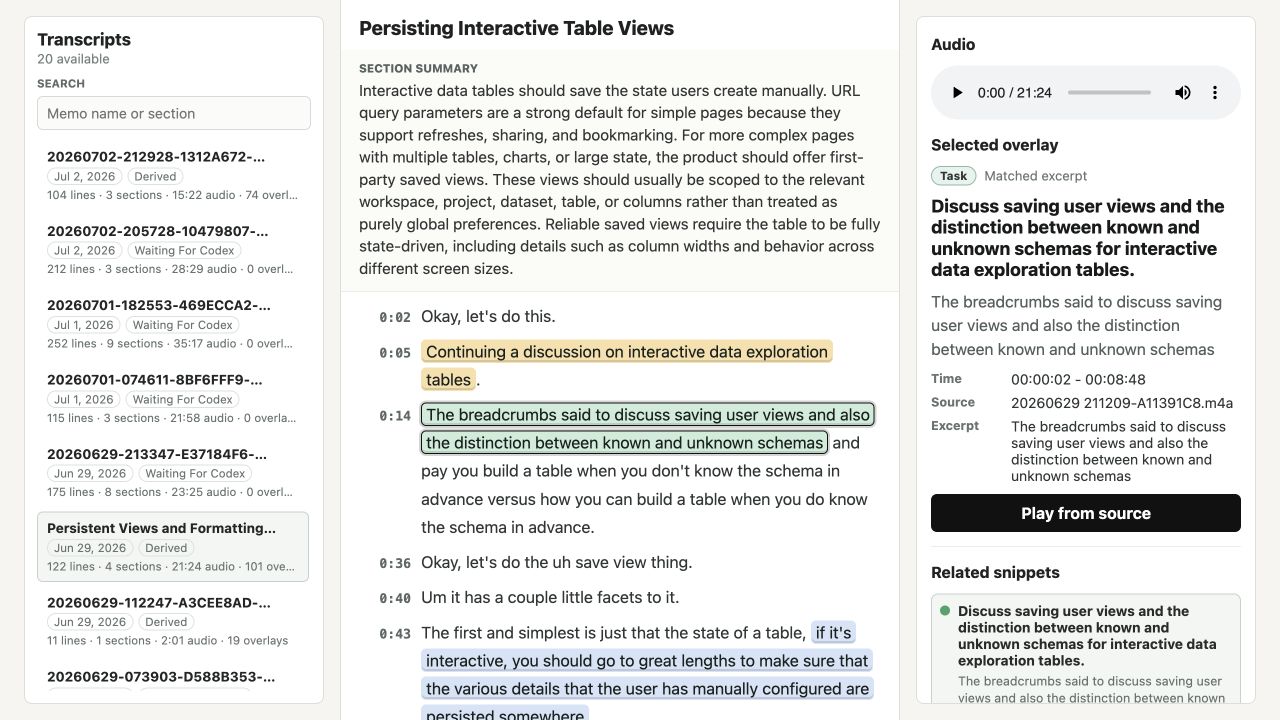
Where the system ended up
The daily command path is still the important part:
npx v2ctx voice-memos --run-llmThat scans Apple Voice Memos, writes one context package per memo under ~/.v2c-voice-memos, skips packages that already have transcript and analysis output, and creates the files needed for review. The older advanced commands are still around for repair and debugging:
npx v2ctx analyze ./demo-context --run-llm --derive
npx v2ctx analyze ./demo-context --prepare-codex
npx v2ctx analyze ./demo-context --import-codex --from ./results/segment-analysis.jsonl --derive
The new OpenAI path is more direct than the earlier Codex packet flow. It loads analysis/segments.json, then runs three model-backed stages:
- Rewrite each segment into a cleaner title, gist, summary, cleaned text, and section hints.
- Extract structured candidates from each segment: tasks, claims, opinions, experiences, quotes, blog seeds, follow-up questions, and sensitive flags.
- Synthesize the whole transcript into a title, summary, themes, top bullets, and section summaries.
The output stays boring on purpose. segment-analysis.jsonl is one record per segment. transcript-summary.json carries the generated title, summary, main bullets, section list, model metadata, and usage metadata. segments.json keeps the updated section structure. The UI does not need to ask the model anything to render the review surface.
Making the transcript readable
The first version of the UI was closer to a static package viewer. It could open generated package files, but it did not yet feel like a place to review spoken work. The current workspace is arranged around the review task.
The left pane is a searchable memo library. Each card shows the package title, date, processing status, line count, section count, audio duration, and overlay count. Duration comes from the package manifest when available, with a fallback to segment or transcript end times. That makes the list useful before opening a memo: a 90-second note and a 20-minute design ramble should not look equivalent.
The center pane is the transcript itself. It starts with the generated title, line count, extracted item count, summary, and key points, then drops into sectioned transcript text.
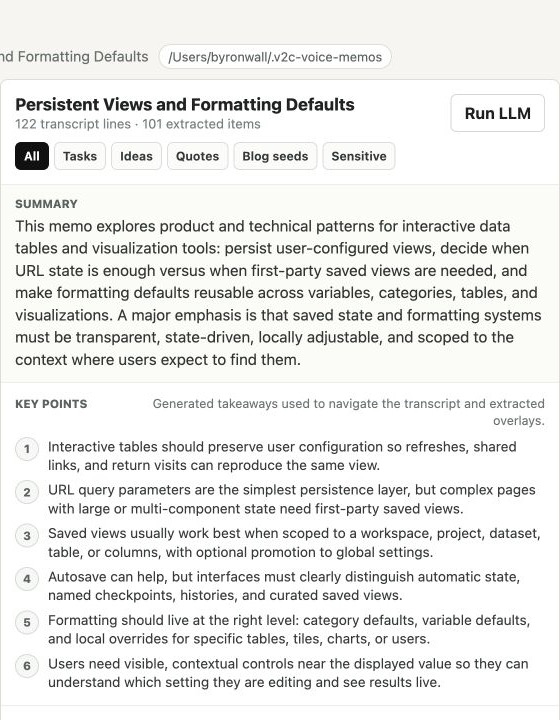
That top area took a few iterations. The original styling made the generated material feel like a pile of large pills. The fix was to make the labels explain the content instead of decorating it: a plain Summary block, a Key points section, and supporting copy that says those bullets are generated takeaways used to navigate the transcript and overlays.
Section summaries got their own treatment too. They now read as full-width bands inside the transcript document, while the text stays aligned with the section heading. That gives each generated summary a clear visual role without turning every section into a card.
Inline evidence, not blocky annotations
The most important UI correction was how extracted evidence appears in the transcript.
The analysis output contains review items such as tasks, ideas, quotes, blog seeds, and sensitive flags. Each item tries to anchor back to the transcript with an excerpt, fuzzy match, timestamp, segment, or an unmatched fallback. Early highlight rendering made those marked regions feel like blocks inserted into the text. That was wrong for reading: a highlighted phrase should wrap like the words around it, not force a new line just because it has a background color.
The underlying issue was the element choice. The marks were still rendered as button elements, and browser form controls behave like atomic inline boxes. Switching them to inline span elements with role="button", pointer styling, focus styling, click handling, and keyboard activation let the highlighted text wrap naturally while preserving selection behavior.
That small DOM change made the transcript feel much less mechanical. The extracted item is still visible, but the sentence keeps flowing.
The right pane closes the loop. Selecting a highlighted region shows the item type, match quality, timestamp, source, excerpt, related snippets, and a Play from source action.
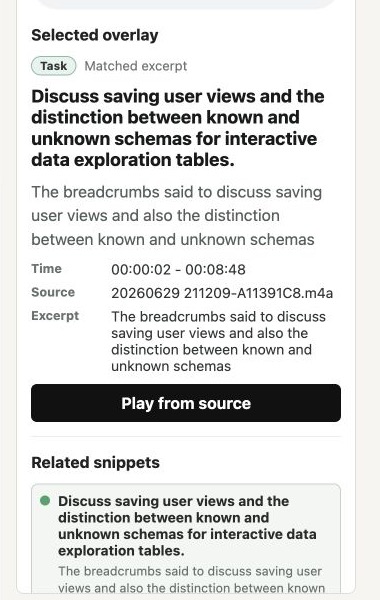
This is the core review loop: read the generated summary, scan the transcript, click an extracted item, check the source excerpt, and play the audio if the claim needs verification.
Deep links as review state
The UI also makes selections linkable. The URL stores both the selected transcript package and selected snippet:
?transcript=<package-name>&snippet=<package-name>::<review-item-id>#section-<segment-id>
That matters because the review workspace is local, but the work still needs durable pointers. A deep link can reopen a package, restore the selected overlay, and scroll to the relevant section. It is a small feature, but it turns a review state into something that can be copied into notes, issues, or future agent prompts.
Making LLM processing accountable
The other big change was the LLM processing path. The logs were already good enough to show progress:
rewrite start: seg_001
rewrite done: seg_001 -> Saving User Views for Interactive Data Tables
extract start: seg_001
extract done: seg_001 -> 46 item(s)
But progress is not the same as accountability. A voice memo pipeline can run many model calls: one rewrite call and one extraction call per segment, then one synthesis call for the transcript. That needs cost visibility while the command runs.
The CLI now normalizes the OpenAI Responses API usage object, reports token and cost details beside every completed call, and aggregates the whole task:
rewrite done: seg_001 (...) (tokens in=..., cached=..., out=..., total=... cost=$...)
extract done: seg_001 -> 46 item(s) (tokens in=..., out=..., total=... cost=$...)
synthesis done: ... (tokens in=..., out=..., total=... cost=$...)
LLM total: tokens in=..., cached=..., out=..., total=... cost=$...
Those totals are also persisted into analysis/transcript-summary.json under usage, alongside the provider, model, call count, token totals, estimated cost, and pricing source metadata. Unknown models still report token counts and mark cost as unknown rather than guessing.
The repeated transcript calls also have a cache-shaped request. The prompt caching implementation keeps the transcript in a stable prefix, sends the changing extraction task last, and records cached_tokens so a cache hit is visible in the same accounting trail.
After adding the cost reporting, the default model changed from gpt-5.5 to gpt-5.4-mini. The more expensive model can still be selected with --llm-model, but the default now matches the everyday workflow: run analysis over personal memos often enough that cost should stay visible and modest.
Why this shape works
The system now has a cleaner separation of responsibilities:
- FFmpeg and local transcription create the durable context package.
- The analysis stage turns transcript sections into structured JSON artifacts.
- The review UI reads those artifacts without needing another model call.
- The audio player and transcript anchors keep every generated item tied back to source evidence.
- The CLI logs and summary metadata make token use and estimated spend inspectable.
That last point is important. This is not an autonomous publishing pipeline. A voice memo can contain a real task, a useful quote, a blog seed, a weak idea, or a sensitive note. The output should become candidates for review, not silent actions.
The review UI is where those candidates become useful. It puts the generated structure next to the raw transcript and the original audio. That is the right level of trust for spoken notes: model help for organization, plain files for inspection, and source playback when something matters.
Source: byronwall/video-to-context
Related: