A voice memo is the fastest way I have to get a thought out. It is also the worst format to come back to. The audio sits in a list with a date for a name, and the only way to find what I said is to play it again.
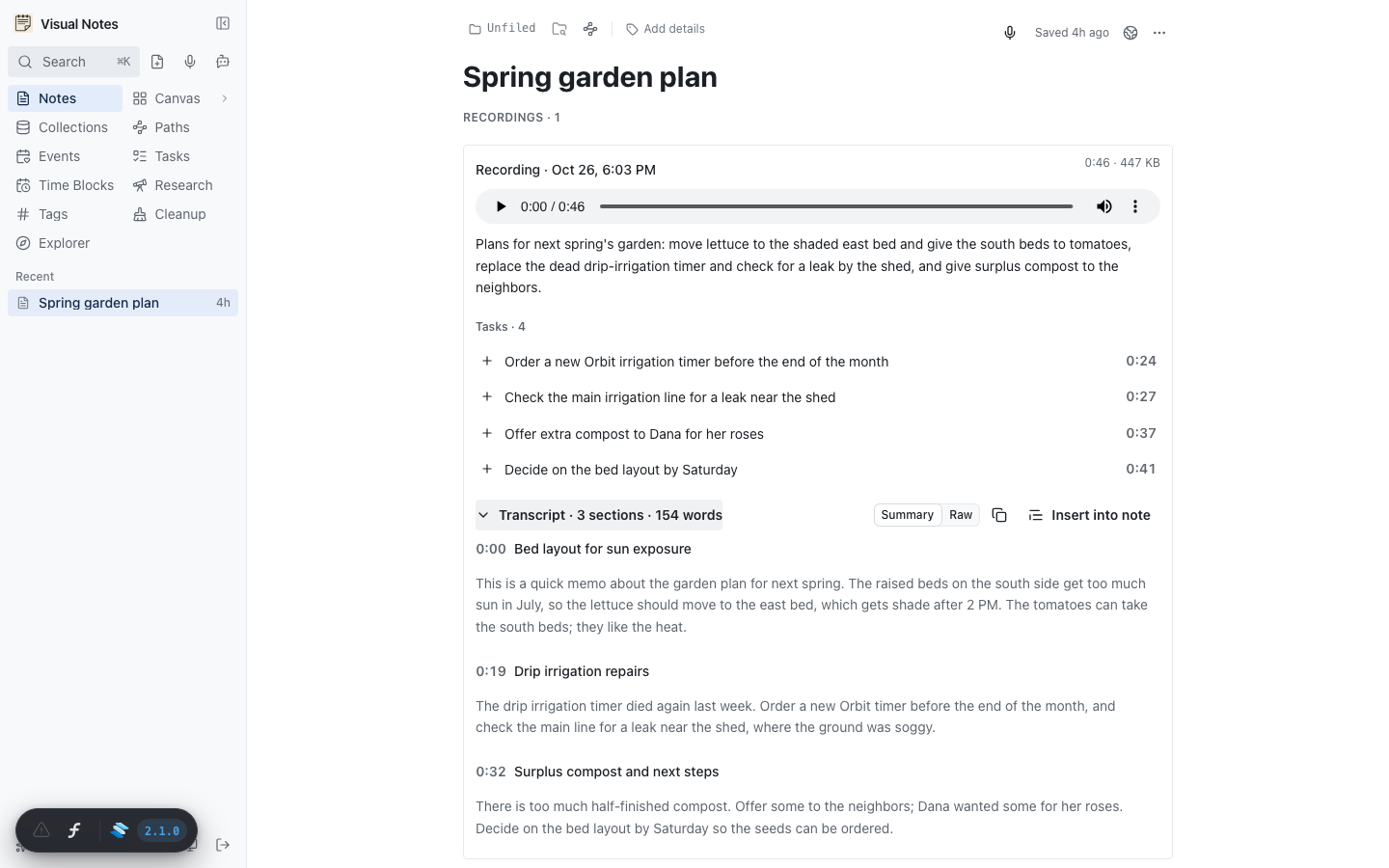
Visual Notes could already record audio on a note. What it could not do was turn that audio into something I would read, search, or hand to an agent. Over one evening, a four-PR stack fixed that. Now a recording comes back as a title, a summary, timed sections, and a list of tasks, and all of it is searchable.
The four layers
The stack splits the work by who reads the transcript.
- The server makes it (#247). Press Stop and the server queues a job.
- Search reads it (#248). Keyword search and embeddings treat the transcript as note text.
- Agents read it (#250). MCP
notes_getreturns the recordings, and a newnotes_get_transcripttool returns the full text. - I read it (#254). The note shows the summary, tasks, and sections under the player.
The order matters. Each layer is useful on its own, and none of them needs the UI to exist. Agents could read transcripts before I could see them in the app.
Speech to text for about four cents an hour
Transcription uses Groq's whisper-large-v3-turbo when a Groq key is set. That costs about $0.04 an hour of audio and takes files up to 100 MB. Without the key, the job falls back to OpenAI whisper-1 through the key the app already has, with a 25 MB limit.
The jobs run one at a time inside the app process. There is no queue service. That is fine for one person's notes, and it keeps the deploy the same single container. The one thing a process queue can lose is work in flight, so at boot the server looks for recordings that were never transcribed. It also picks up interrupted recordings that have been quiet for 15 minutes, since a phone tab that died mid-memo still leaves a playable file.
The cheapest fix in the whole stack is one line. Whisper accepts a short prompt, and it uses that prompt to bias spelling. Without it, my project words came back wrong:
| Said | Without the prompt | With the prompt |
|---|---|---|
| Groq | Grok | Groq |
| VPS | VPs | VPS |
| UMAP | UMAT | UMAP |
The prompt is a comma-separated list of names: Visual Notes, MCP, Groq, Coolify, UMAP, SolidStart, Prisma, and so on. An env variable overrides it.
One structured call for the rest
Raw Whisper output is a list of timed segments. That is accurate, but not readable. After speech to text, one structured LLM call (gpt-5.4-mini) returns:
- a title and a summary
- top bullets and themes
- timed sections with cleaned text
- tasks, each with the excerpt it came from
The prompt is not new. It is ported from the transcript_plan step in Video to Context, where I first built a review UI for LLM-processed voice memos. That tool worked on folders of files on my laptop. This version puts the same output on the note where the memo already lives.
The result also feeds the note. A note still named "Voice note · Oct 26…" takes the transcript's title. Every transcript on a note rolls up into one audioText field, and search and embeddings read that field. A voice note with an empty body now gets embedded and lands on the canvas like any other note.
Summary is not what I said
The first version of the panel showed the LLM's section text and called it the transcript. On real memos, that text reads like "The speaker considers…". It is a summary. My own words were not visible anywhere in the app.
So the panel got a Summary / Raw switch (#258). Both forms use the same section headings, so your place does not jump when you switch. Raw puts the Whisper segments back under each heading as plain prose. Click any phrase to play from there, and the phrase being played stays highlighted.
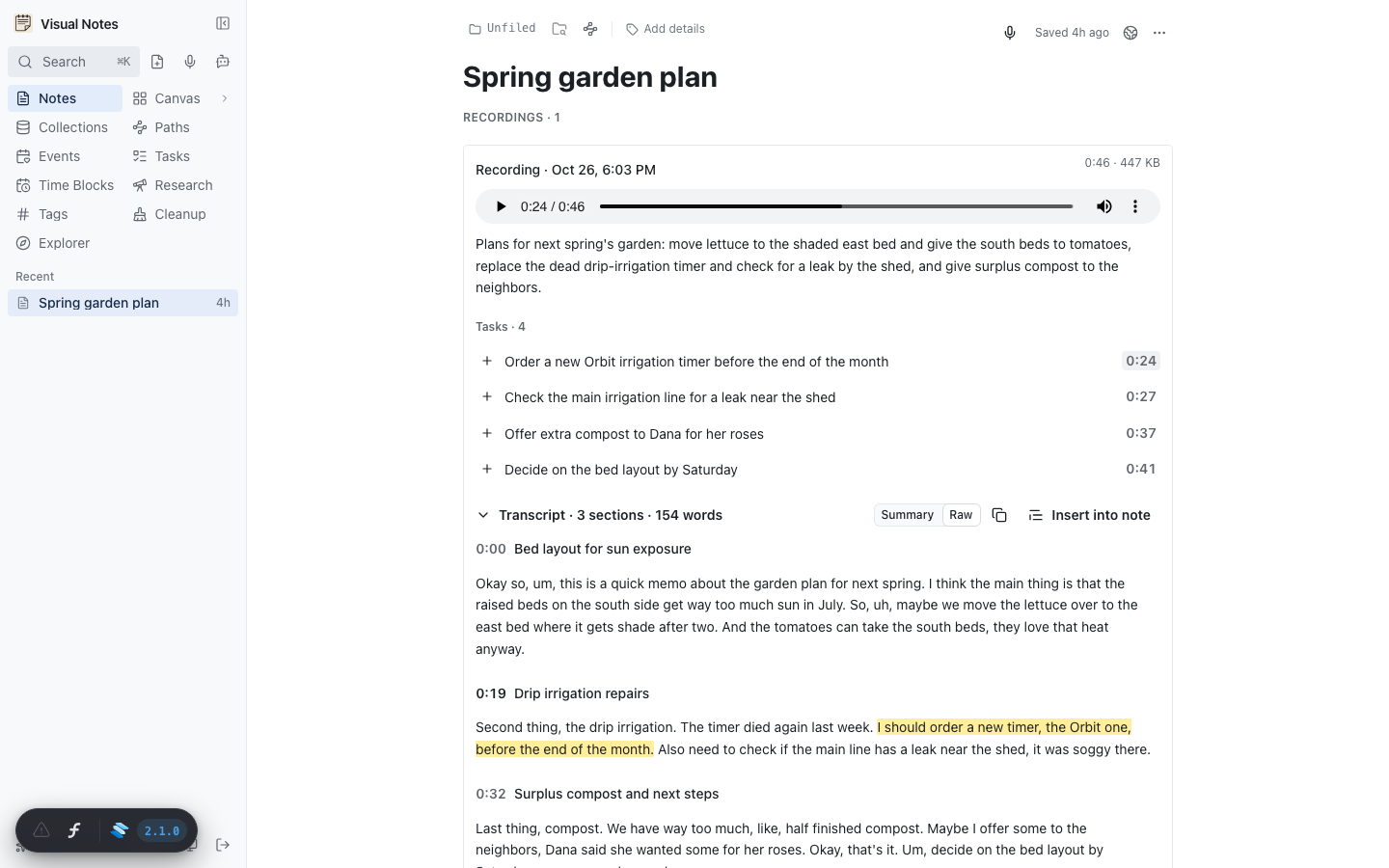
Tasks got the same treatment. Each task carries an excerpt, and the app matches the first five words of that excerpt against the raw words. Click a task's time and Raw opens on the sentence where you said it. That is the detail that makes the tasks trustworthy. A task the model made up has no sentence to land on.
The + on a task adds a task block to the note, and the editor turns that block into a real Inbox task. Insert into note copies the sections into the note body, in whichever form is showing.
Getting old memos in
Not every memo starts in the app. Plenty of them sit in macOS Voice Memos. So you can now drag a stack of .m4a files from Finder onto any note (#255).
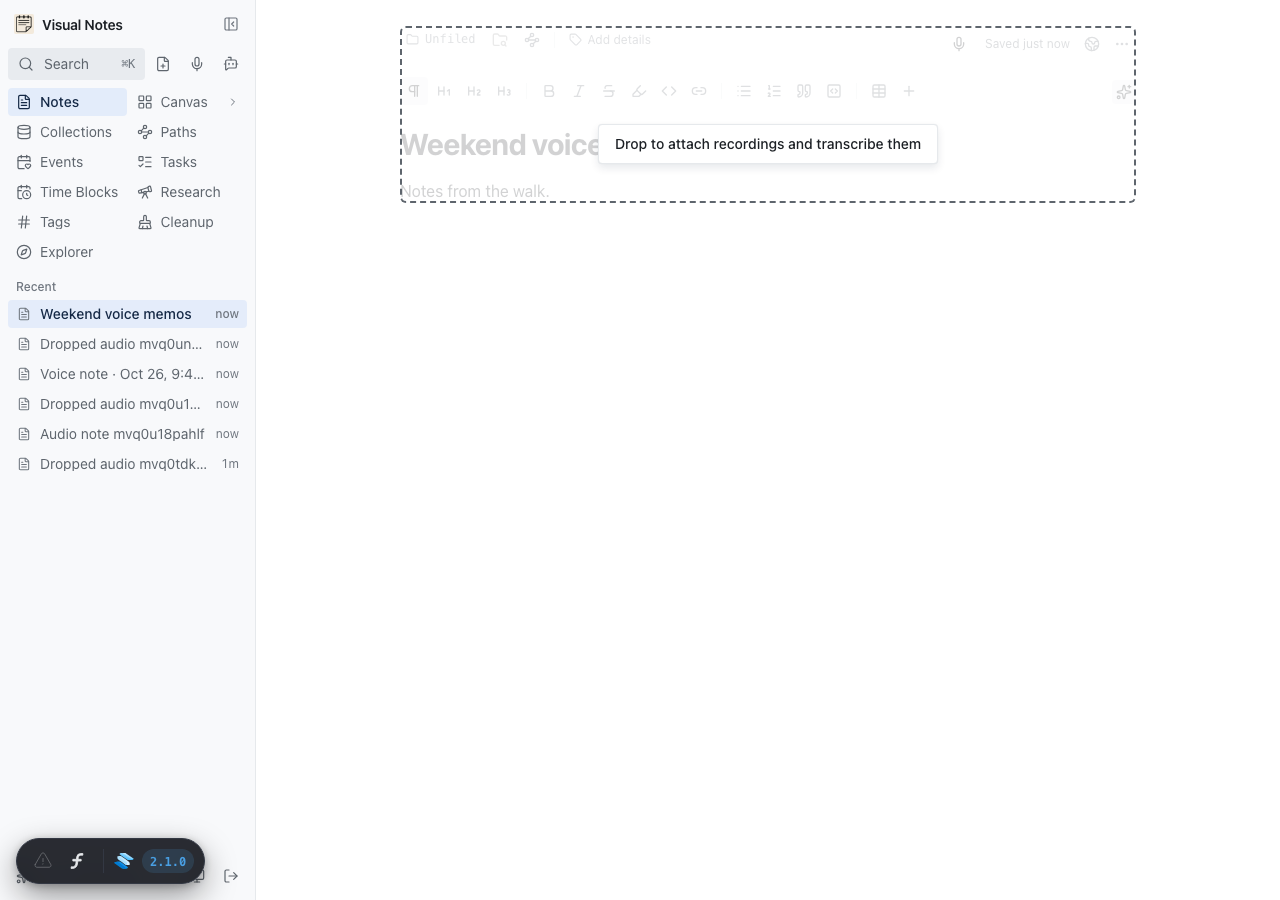
Each file becomes a recording on that note and queues a transcript. The label is the file name. The recording date is the file's modified time, so a stack of memos sorts in the order I recorded them, not the order they uploaded. Non-audio files in the same drop still become normal attachments.
Later PRs filled in the rest of the life cycle: move a recording to another note with its transcript, and delete one, after a confirm, with its file (#267).
Cleanup almost deleted them
Visual Notes has a cleanup queue that suggests what to do with each note. A voice note's body is nearly empty, just the "Voice note · …" heading. Every decision model looked at that and saw a stub. It suggested Delete.
That was worse than a bad suggestion. Every cleanup action archives the note, and the archive purge deletes a note's recordings after 30 days. So the rule is now blunt: a note with recordings always goes to Keep (#259). The model also reads the transcript as part of the body, so it can still suggest a better folder. A finished transcript marks the old assessment stale, so a voice note judged while it was empty gets looked at again.
A memo link as a work order
The layer that pays off most is not in the app's UI. It is MCP.
On October 28 I recorded about three minutes of feedback on my Bible reading app: closing a side trip lost my place, and the study notes repeated themselves. Four days later I gave a Claude Code session only the link to that note. The session called notes_get, which returned the summary, tasks, and sections. Then it called notes_get_transcript with format: "raw" to read my exact words.
From that, it wrote down the intent behind the feedback, changed the rules for the study notes, and opened three stacked PRs: the method rules and a new prompt, a reader fix that keeps your place in the URL, and a notes panel change. The new rules cut John's verse notes from 362 to 210. The whole chain, from memo to merged and live, started from one note link.
That works because the transcript is not a blob of text. The summary tells the agent what the memo is about. The raw form gives it my wording when the wording matters. The tasks give it a list to check against. An agent with only the audio file, or only a summary, would have to guess at one of those.
What it costs and where it stops
Per memo, the cost is the Whisper minutes plus one small LLM call. At $0.04 an hour of audio, a three-minute memo costs a fraction of a cent to transcribe.
The limits are real, though. The jobs run in one process, so a burst of fifty dropped memos waits in line. The task excerpt match is exact on five words, so a task the model paraphrased loses its time link. And the vocabulary prompt only fixes words I thought to list. A new project name will come back misspelled until I add it.
For a personal notes app, those limits are fine. A single process queue, a vocabulary list, and one structured call are enough to turn a memo into a note that people and agents can both use.