The last time I wrote about User Flow Workbench, it had just learned to render wireframes beside observed screens. The workbench already understood operational flows and capability overviews. Wireframes added the shape of a screen.
That was useful, but it exposed the next problem. I had several good artifacts that described different parts of the same product. I still had to assemble them in my head.
The tool now has a fourth view: an application map. It connects pages, page states, conceptual objects, navigation, and the other diagrams. The result is one workbench that can move from product scope to behavior to screens to the application that holds them together.
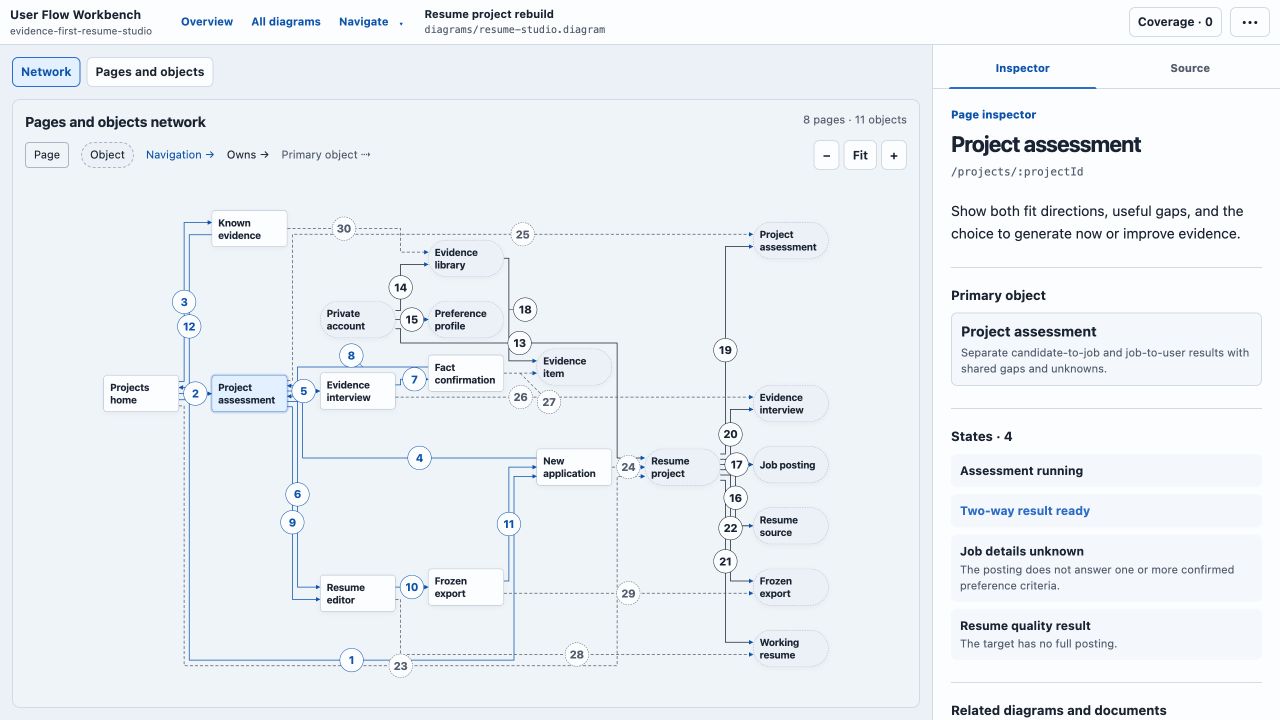
This is the new starting point. The network combines eight pages and eleven domain objects. Selecting a page shows its states and links to the supporting capability, flow step, wireframe screen, and design document.
Four questions, one project
Each diagram type answers a different question.
| Type | Question |
|---|---|
flow | What happens, in what order, and where do handoffs occur? |
overview | What can this product do, and how is that capability set grouped? |
wireframe | What might a screen look like beside the evidence for the current interface? |
application | Which pages, states, objects, and navigation paths connect the other artifacts? |
This is the important boundary: all-in-one does not mean one universal graph model.
A wireframe is not a flow with differently shaped nodes. An application page is not a capability with a route attached. Forcing those ideas into one abstract schema would make the source harder to understand and would weaken the checks each document needs.
Instead, every source uses the same envelope and extension:
diagram 1
type flow
The second line can also select overview, wireframe, or application. After that, each body keeps its own semantics. The workbench shares discovery, navigation, validation, rendering, and the project shell. It does not pretend that every visual has the same meaning.
The application map completed the loop
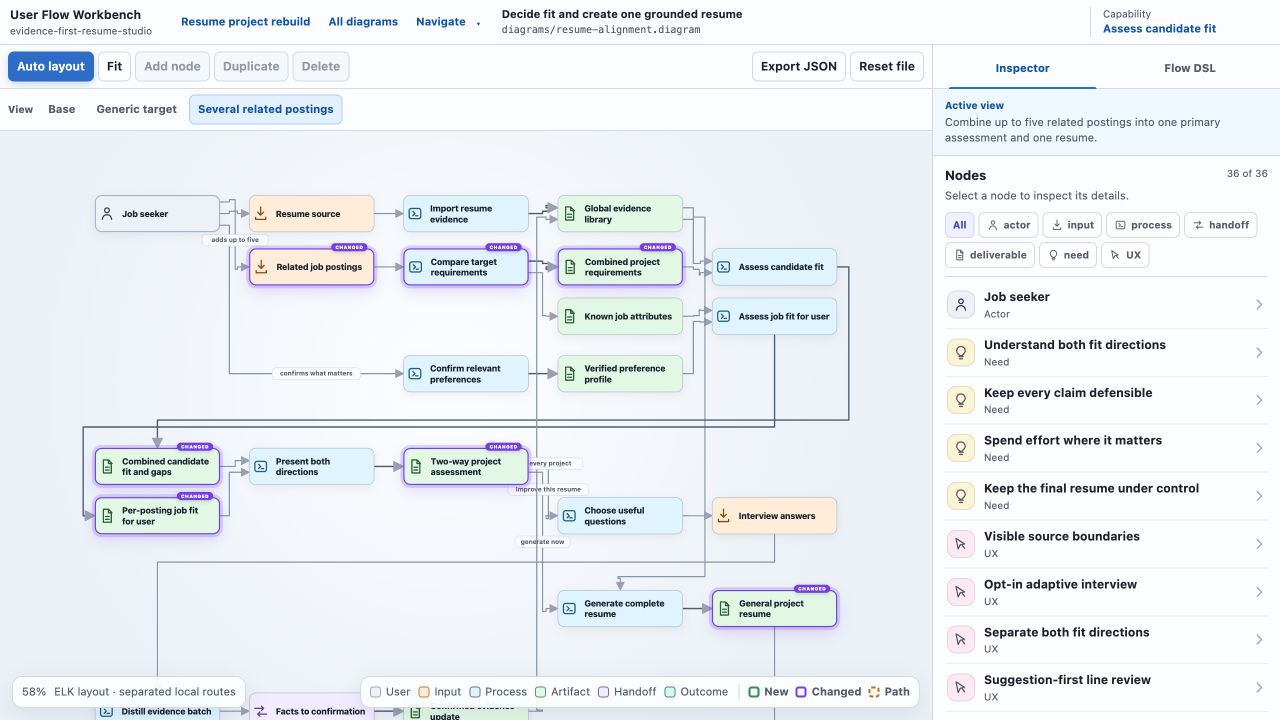
The first flow prototype started with a person on the left, an outcome on the right, and the work between them. It grew into a typed semantic graph with stable IDs, variant operations, automatic layout, manual positioning, and an inspector.
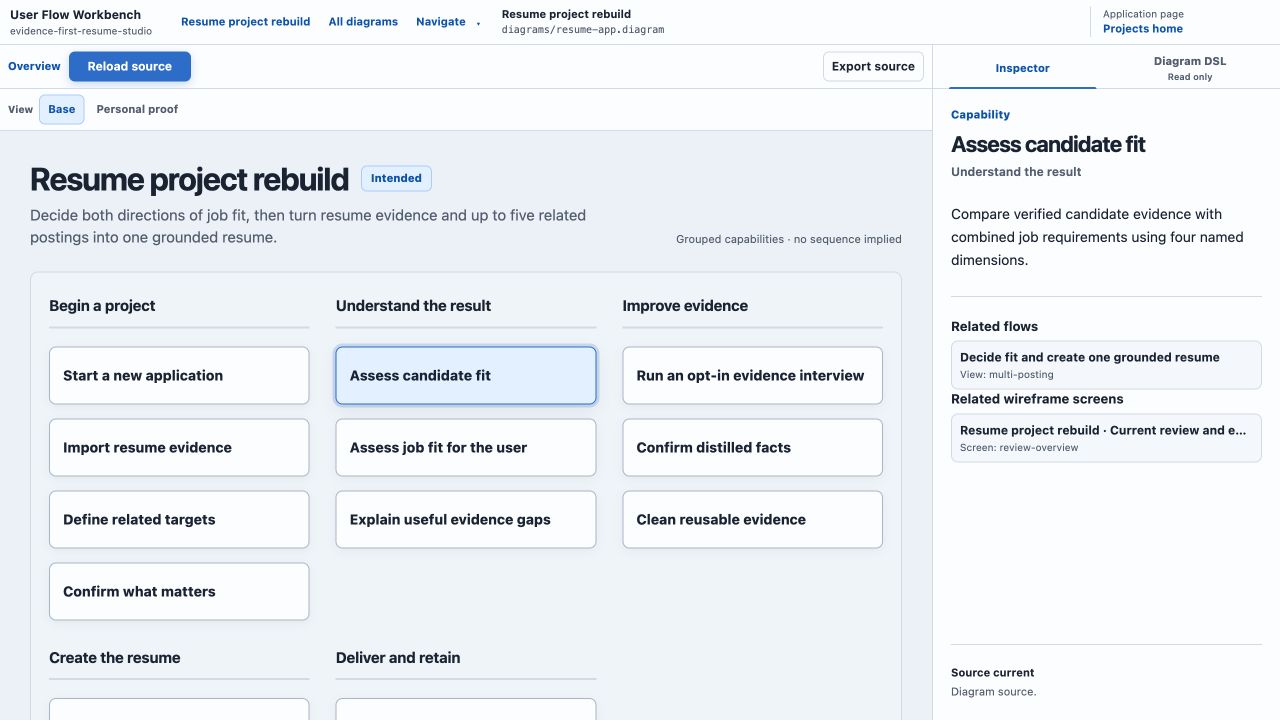
The overview added product scope. It groups capabilities without implying sequence. A capability can link to a flow or a specific wireframe screen, but folder membership does not invent a semantic relationship.
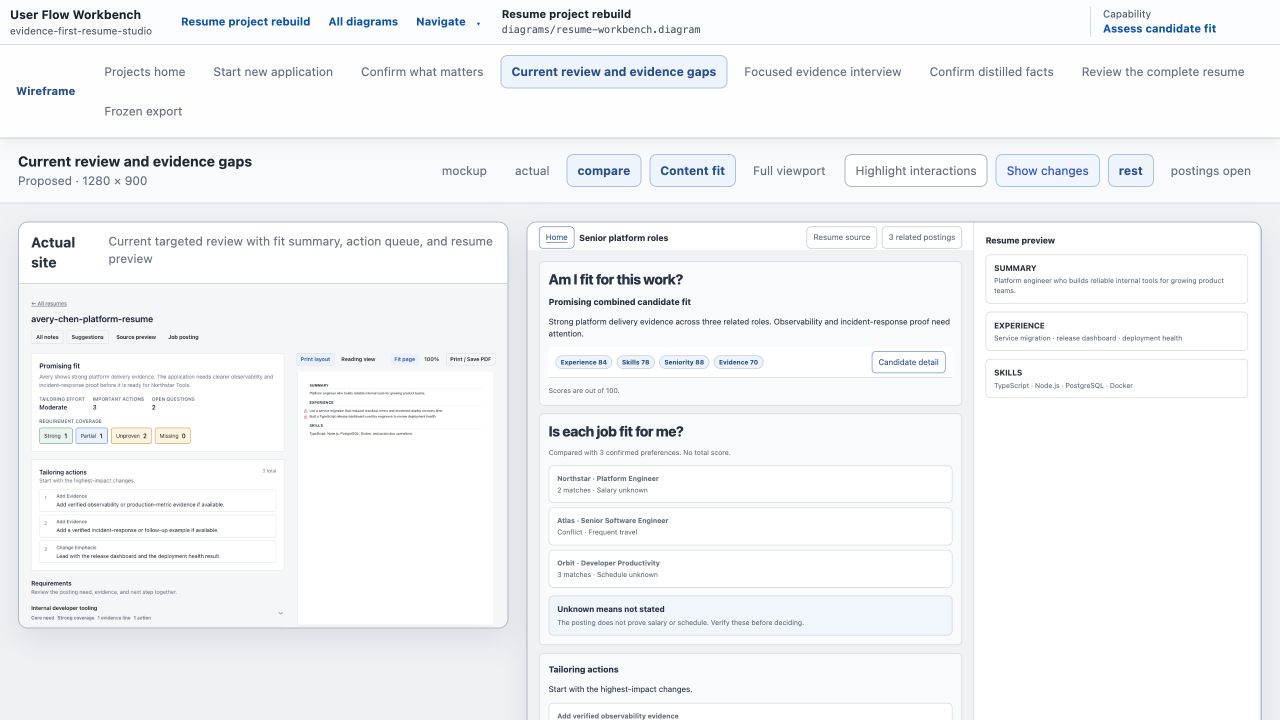
Wireframes added interface evidence. A screen can be observed, reconstructed from source, or proposed. That distinction matters because a clean proposed screen is not proof that it belongs in the current product.
The application map now provides the crosswalk. It can describe pages, authored states, domain objects, ownership, cardinality, and navigation. A page can point to the exact capability, flow node, or wireframe screen that supports it.
diagram 1
type application

application resume-studio "Resume project rebuild"
object project "Project"

page home "Projects" route="/projects" primary=project {
  state returning "Unfinished projects"
  overview "diagrams/resume-app.diagram" capability=start-application
  flow "diagrams/resume-alignment.diagram" node=user
  wireframe "diagrams/resume-workbench.diagram" screen=home
}

page new-application "New application" route="/projects/new" primary=project {
  state full-posting "Full posting supplied"
  overview "diagrams/resume-app.diagram" capability=import-resume
  wireframe "diagrams/resume-workbench.diagram" screen=new-application
}

nav home-to-new home -> new-application trigger="Start new application"
Those references stay explicit. The viewer can warn when a linked target is missing or when an authored page has no wireframe. It does not guess relationships from filenames or similar titles. The application network also gives the project a left-to-right page and object map instead of another folder list.
The complete path is now visible:
product capabilities
    ↓
operational flows
    ↓
proposed and observed screens
    ↓
pages, states, objects, and navigation
That is what I wanted from the combined tool. I can start at the application, move into one capability, inspect its flow, open the related screen, and return with the same context.
The DSL did not need a clever replacement
Combining the pieces made the language less consistent. Similar values used different quoting rules in different document types. The application parser accepted undocumented aliases. The overview parser allowed more than one way to write the same reference. The wireframe formatter often returned its retained source instead of serializing the current parsed model.
None of those problems made the files dramatically longer. They made the rules harder to predict.
I used ChatGPT Pro to test whether this was a local cleanup or a reason to replace the DSL. The evaluation compared the current language with six alternatives across 28 dimensions. The candidates included an indentation-led language, a uniform block grammar, JSON, contextual variant shorthand, and generated IDs.
The more aggressive options were shorter. They also made edits less dependable. Generated IDs broke durable targets for renames, parallel edges, variants, and cross-document references. Indentation saved braces but made recovery and partial edits more fragile. A universal block grammar added consistency at the cost of more machinery.
The winning option was called Narrow canonical. It scored 88.9 out of 100, compared with 83.2 for the existing language. The sample corpus only became about one or two percent shorter. The improvement came from fewer authoring rules and one canonical representation.
The final changes were small:
- Human text and paths remain quoted.
- Identifiers, enums, booleans, and numbers are bare.
- Every parser accepts the same three string escapes:
\",\\, and\n. - Undocumented cardinality and navigation aliases are gone.
- Wireframe screens state their evidence basis.
- The wireframe formatter serializes the full parsed model instead of returning stale source.
- Stable IDs, braces, typed references, and explicit variant operations remain.
For example, identifier options now read consistently:
flow "resume-alignment.diagram" variant=per-job-resume
wireframe "resume-workbench.diagram" screen=review
add capability approve "Approve the result" group=review
This is not much shorter than the quoted form. It is easier to predict. An agent does not need a document-specific rule to decide whether review is an identifier or human text.
Test the output, then update the process
The earlier wireframe work established a useful sequence: prove the visual result before committing to the language. The DSL cleanup used the same idea at a different layer.
First, compare real candidates instead of arguing from taste. Then preserve the parts that carry meaning. Add parser and formatter checks before rewriting sources. Finally, run the new language against the maintained corpus and known projects that already use it.
The focused parser suite passed 43 tests. The overview suite passed 74. TypeScript passed. Thirteen maintained diagrams and 15 diagrams in three other projects passed structural and canonical format checks. The broad DSL command still exposed two baseline conditions: the sandbox could not open its loopback port, and an older production fixture was missing. I verified the loopback case outside the sandbox and kept the missing fixture separate from the language result instead of calling the full suite clean.
The command and the authoring skill were part of the rollout:
flow check path/to/project
flow format --check path/to/project
flow view path/to/project
flow render path/to/diagrams --output-dir previews --contact-sheet
The installed flow command, the packaged viewer, the repository specification, and the agent skill now use the same language. That matters more than a syntax score. A concise DSL is not useful if the formatter, examples, and machine-wide tool disagree about what is valid.
What all-in-one means here
User Flow Workbench now has one project root, one .diagram extension, one CLI, one viewer, and explicit links across four kinds of artifact. That is enough to inspect a product from several useful distances without building four disconnected tools.
It still has a deliberate ceiling. It is not a production UI generator, a general vector editor, a database modeler, or a backlog. Application maps are read-only. Wireframes use a constrained visual vocabulary. Flows keep their operational and semantic meanings separate. The source remains the artifact an agent edits.
The useful default is to share the workflow and keep the meanings distinct. If another diagram type eventually belongs here, it should earn its place by connecting a missing product question—not by making the tool sound more universal.
Source: byronwall/user-flow-workbench