Plenty of diagrams are about code. Why a query is slow. Which branch of a function a request takes. What a diff actually changes. Until now Draftably could not show code at all.
The example that started this was a generated SQL query with six nested copies of the same join. To explain it, the diagram had to fake a listing: one box per clause, nested groups for subqueries, a hand-set size on all 14 boxes, and \n escapes for continuation lines. The text came out centered, unindented and uncolored. The SQL had to be cut down to fragments, which removed the nesting the diagram was supposed to explain.
Every node label went through code built for short titles. It split on whitespace, so indentation disappeared. It centered every line. It needed \" for every quote in JSON or shell. That is fine for "Checkout calls the payments API". It is useless for a YAML file.
So code is now its own shape. The release adds four things:
- A
codenode with a heredoc body. - Syntax highlighting for seven languages.
- Named line ranges that edges and notes can point at.
src=, which reads the code from a file next to the diagram.
A code node
The body goes between <<TS and a line that holds only TS. Everything in between is verbatim. Quotes, #, // and backslashes are text, so you paste code in unchanged.
diagram "A retry, in code"

node call "Checkout calls the payments API" color=blue
node retry "fetch.ts" shape=code lang=ts numbers=on <<TS
  // Retry a request with backoff
  export async function fetchWithRetry(url: string, tries = 3) {
    for (let i = 0; i < tries; i++) {
      const res = await fetch(url);
      if (res.ok) return res;
      await sleep(2 ** i * 100);
    }
    throw new Error(`gave up after ${tries} tries`);
  }
TS
edge e1 call -> retry "every request"
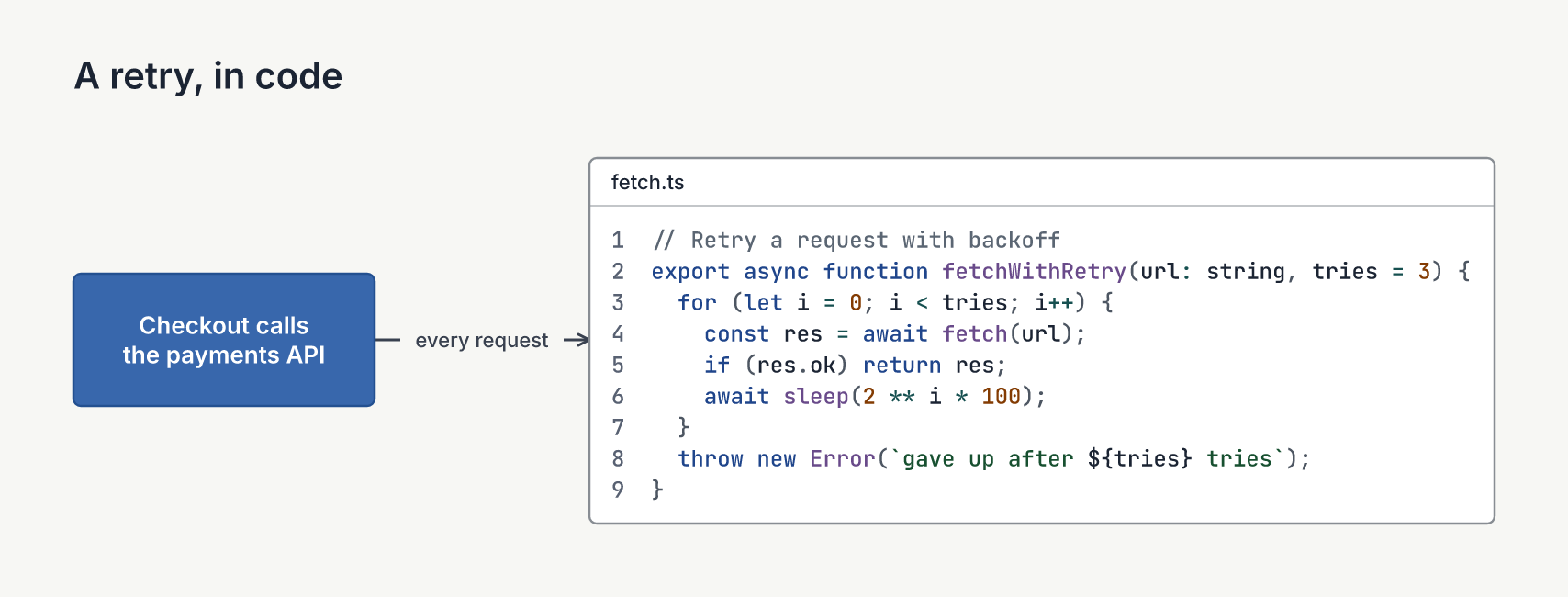
The shared indent is removed, so the body can sit indented under its node line. The box sizes itself to the longest line and the line count, with no size statements. The quoted label becomes a caption band, like a file tab. numbers=on adds line numbers, and start= sets the first one.
Long lines wrap with a hanging indent and a ↩ in the margin, up to max-width= (960 px by default, about 130 columns). wrap=off cuts them with … instead. Either way, check warns about the line, at its real line in the file.
The hard requirement was that every renderer puts every character in the same place. The viewer, inspect --svg, PNG and PDF all draw JetBrains Mono at exact columns. Each run of text sits at its own column, so nothing depends on how a renderer handles whitespace. A diff keeps its +, - and space column, and Python indented eight levels deep still lines up.
Seven languages
lang= picks the colors: sql, python, ts, js, json, yaml, sh or diff. Keywords, strings, numbers, comments, function names, operators and punctuation each get a color from the theme's own families. Here are four of them in Blueprint, the dark theme:
diagram "Four of the seven languages"
theme blueprint

node py "builder.py" shape=code lang=python <<PY
  def body_for(aggregate, domain):
      """Yield one subquery per aggregate column."""
      for column in aggregate.columns:
          if column.needs_domain:
              # each aggregate gets its own copy
              yield Subquery(select=[*domain.keys, column.expr])
PY
node yml "deploy.yaml" shape=code lang=yaml <<YAML
  ...
YAML
node sh "nightly.sh" shape=code lang=sh <<SH
  ...
SH
node fix "the fix" shape=code lang=diff <<DIFF
  @@ -12,4 +12,2 @@ def body_for(aggregate, domain):
  -            yield Subquery(select=[*domain.keys, column.expr])
  +            yield shared(domain).column(column.expr)
DIFF
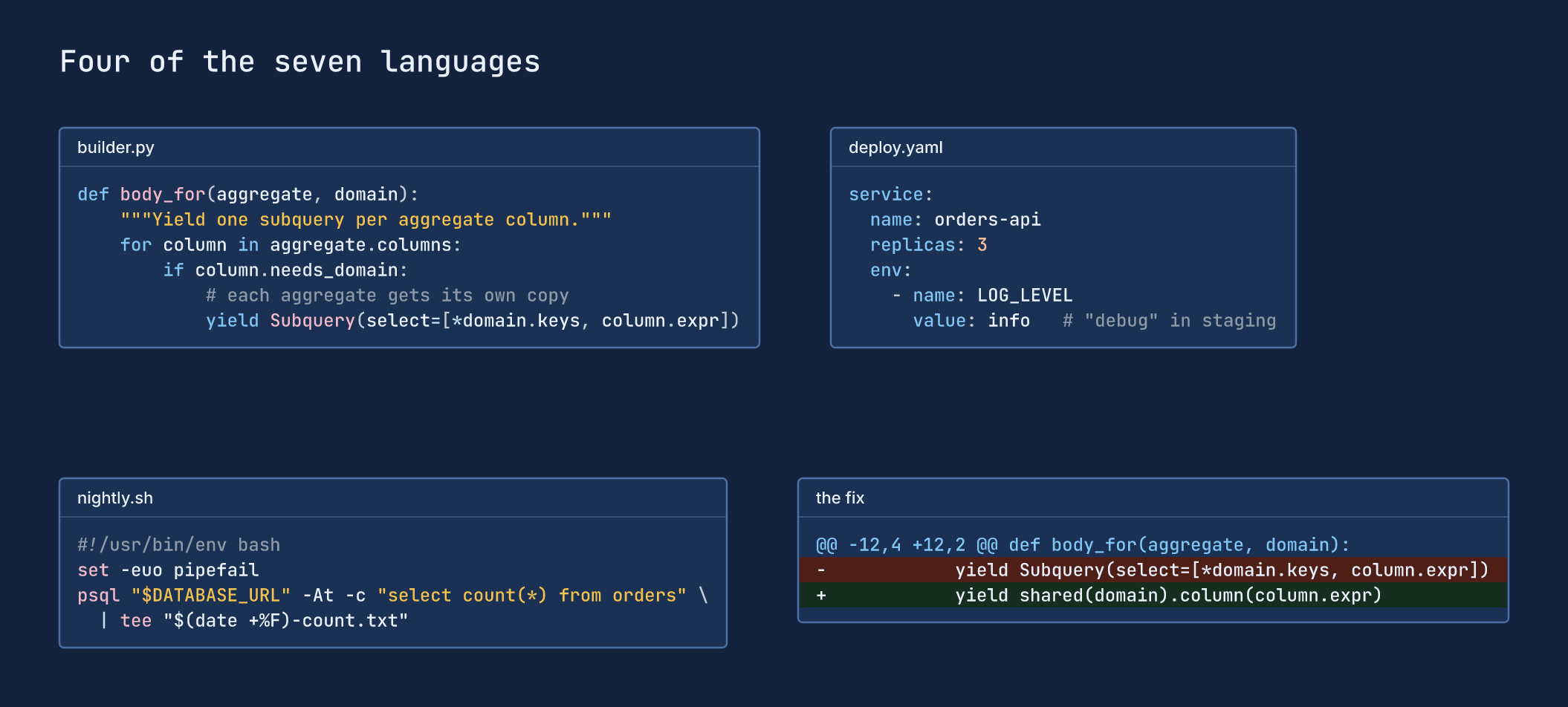
The colors are color only. No bold, no italic, nothing moves, so highlighting can never change a layout. A test holds every token color at 4.5:1 contrast against the code fill, in every theme, on the default fill and on a colored node. In a diff, + and - lines get green and red bands that cover every row of a wrapped line.
SQL, JSON, YAML and diff are exact. Python, TS/JS and shell are close but not exact: a regex literal, ${…} inside a template literal, and shell quoting nested in $(…) stay uncolored. An unknown lang= draws plain text, and check adds an info note.
Line ranges
A listing by itself doesn't explain much. What explains code is pointing at a part of it. So you can now name lines of a code node, and the name works like any other object.
range sql.scan1 lines=3-5 color=red "scan 1"
range sql.scan2 match="COUNT\\(\\*\\)" span=3 color=red "scan 2"
range fix.one lines=4-5 color=green "one scan"

edge runs report -> sql.scan1 "runs"
edge merge sql.scan2 -> fix.one "merge into scan 1"
note "Each scan reads every order row." near=sql side=below
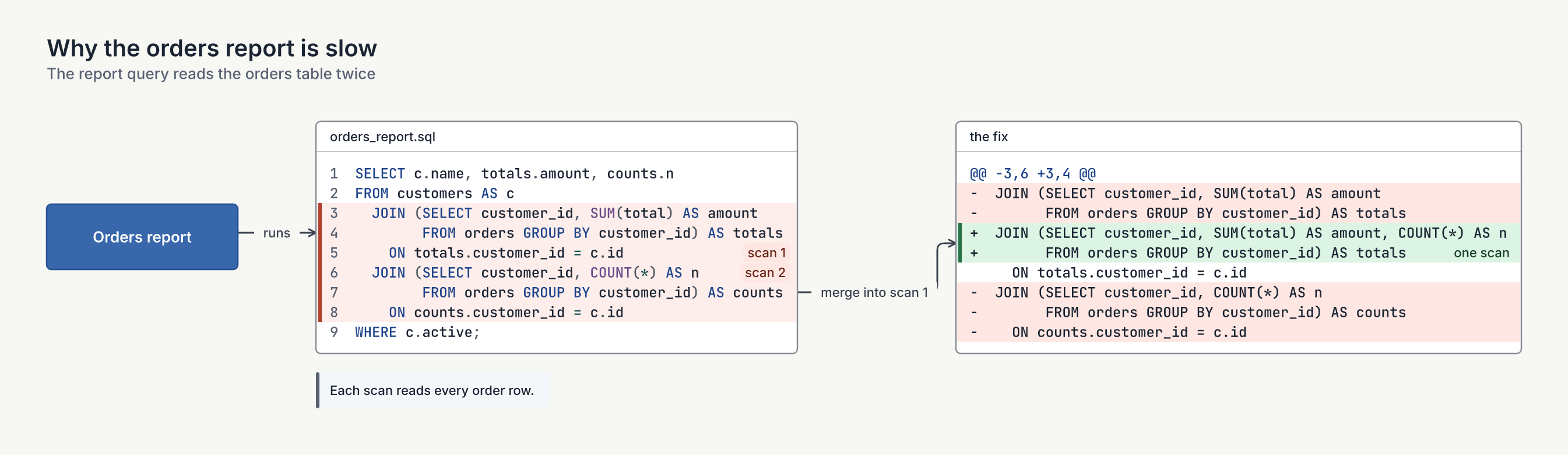
That is the code-review example that ships with Draftably. A range draws a band behind its lines, a bar in the left margin and its label as a tag on the right. An edge to a range ends on the side of the node at the range's middle line, so the arrow lands on the code it is about, not the middle of the box.
lines= is the obvious way to name lines, but it breaks when the code above changes. match= finds the first line that matches a pattern instead, and span= covers that many lines. The pattern is a quoted string, so each backslash is written twice. check gives an error when a pattern hits nothing and a warning when it hits more than one line.
Here is the original six-copies query. There are seven ranges: six red copies, and a blue block that holds copies 4 to 6. Ranges can nest and overlap. Bands blend, bars stand side by side and labels stack.
node sql "generated query" shape=code lang=sql numbers=on <<SQL
  ... 29 lines of SQL ...
SQL

range sql.copy1 lines=3-4 color=red "copy 1 · outer rows"
range sql.copy2 lines=7-8 color=red "copy 2 · count"
range sql.copy3 lines=11-12 color=red "copy 3 · sum"
range sql.top lines=15-28 color=blue "top 50, recomputed"
range sql.copy4 lines=17-18 color=red "copy 4"
range sql.copy5 match="COUNT\\(\\*\\) AS N" span=3 color=red "copy 5"
range sql.copy6 match="SUM\\(I\\.QTY\\) AS Q" span=3 color=red "copy 6"

note "Each copy re-joins every order row before it aggregates." near=sql.copy2 side=right
edge e1 cost -> sql.copy1 "scan 1 of 6"
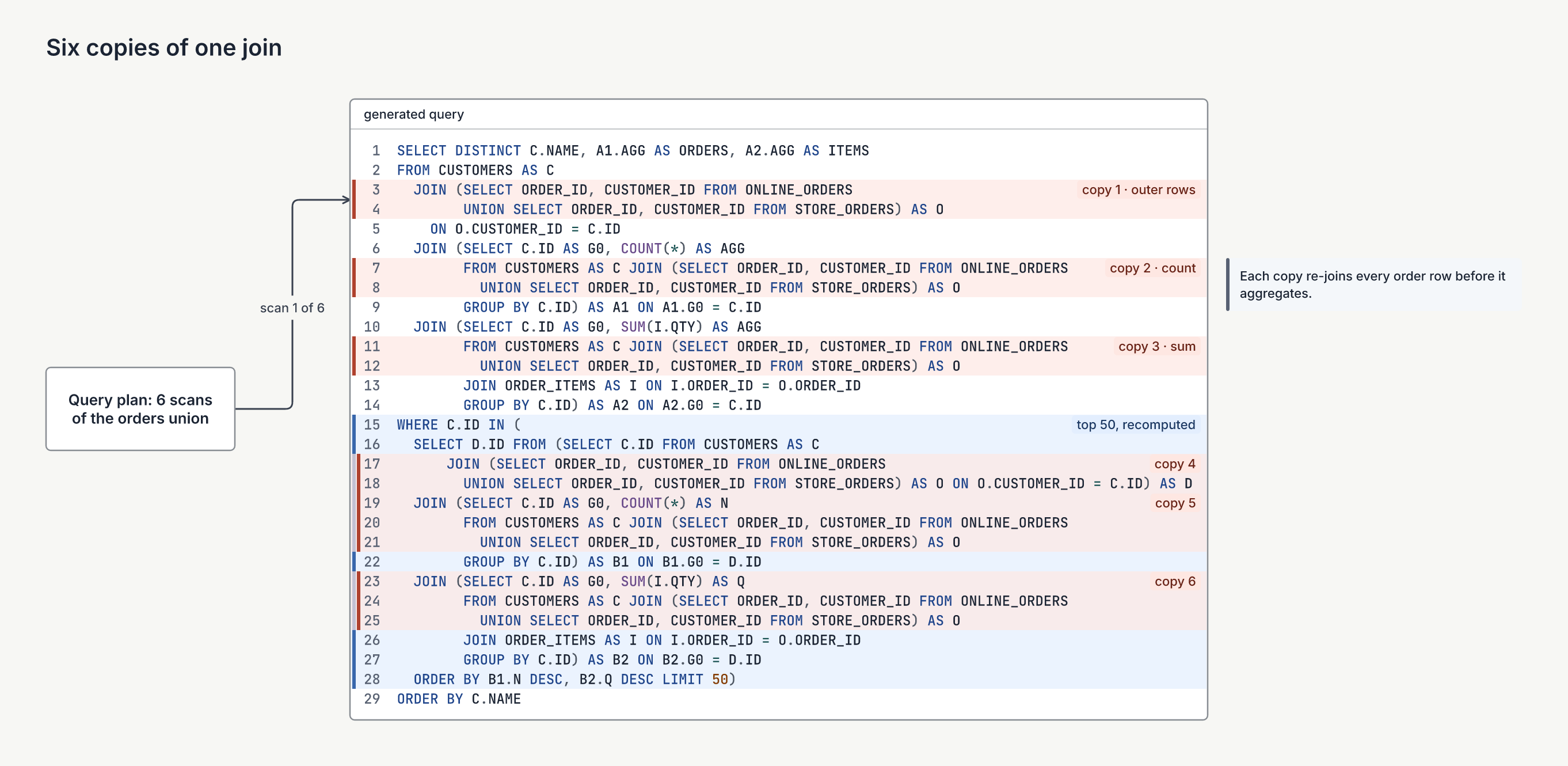
This is the diagram the box-per-clause version could not draw. The whole query is there, with its real nesting, and the repeated work is marked on top of it.
Ranges never change the node's size or the layout. A test checks that the diagram's geometry is the same with and without its range lines. Ranges also work in emphasis states: a state that lists one range keeps it in focus and fades the node's other ranges.
Code from a file
An inline body is a copy. For a short excerpt that is fine. For a 200-line query that lives in the repository, the copy goes stale the first time someone edits the real file.
src= reads the lines from the file instead:
diagram "Where the orders report reads"
subtitle "One pass over orders gives both totals and counts"

node report "Orders report" color=blue
node sql "queries/orders.sql" shape=code src="queries/orders.sql#L4-L14" numbers=on
range sql.pass lines=8-12 color=green "one pass"
edge runs report -> sql.pass "runs"
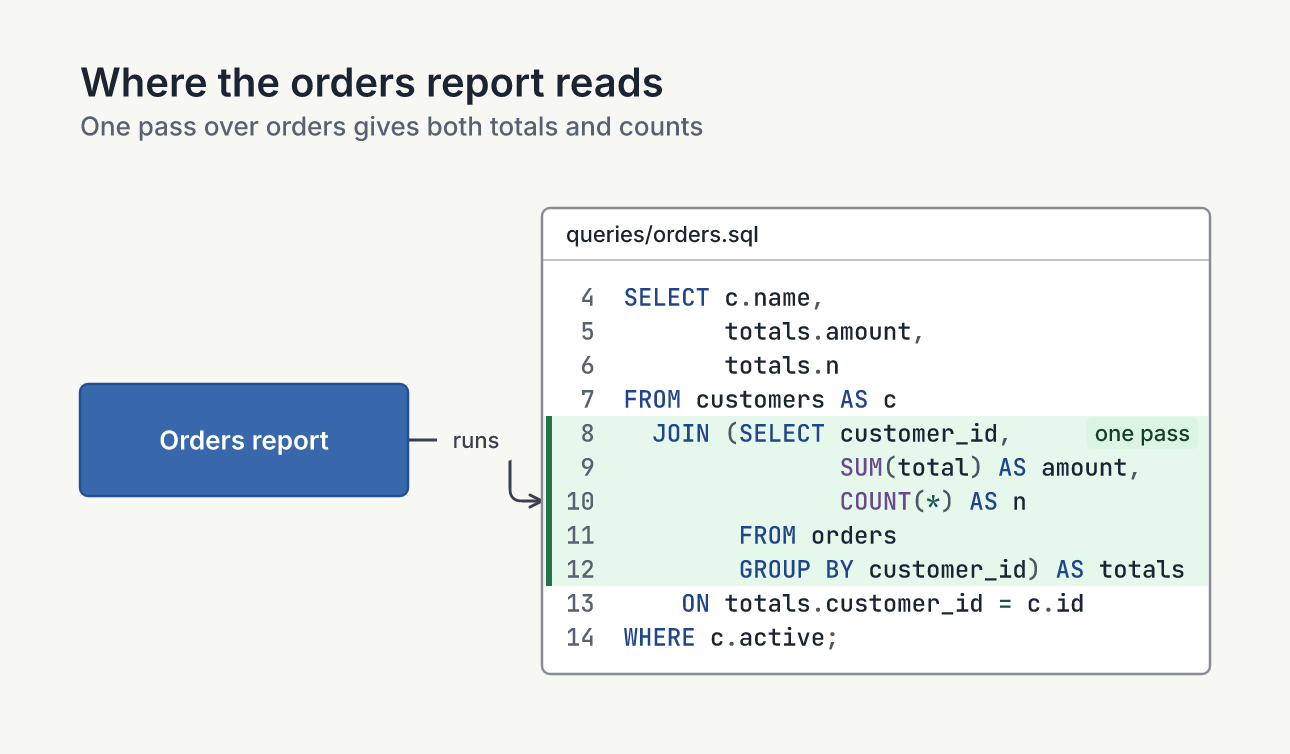
#L4-L14 takes lines 4 to 14, and #L4 takes one line. With no #L… you get the whole file. lang= comes from the extension. start= comes from the first line of the range, so line numbers and range … lines= use the file's own numbers. The range above says lines=8-12, and that is lines 8 to 12 of orders.sql.
draftably open watches the file. Save it in your editor and the open diagram redraws in place, without a page reload:
| Before the edit | After the edit |
|---|---|
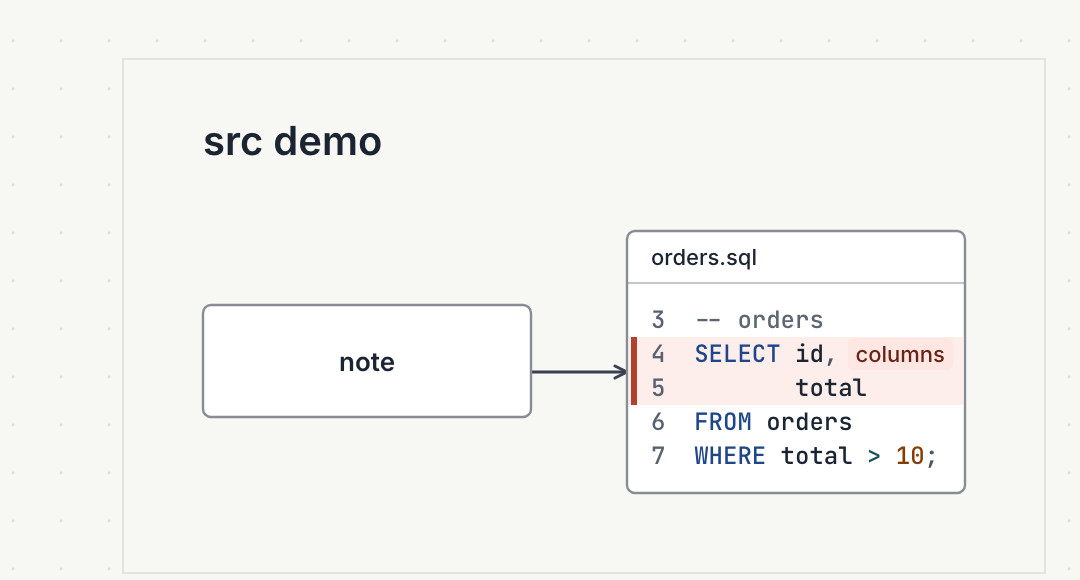 | 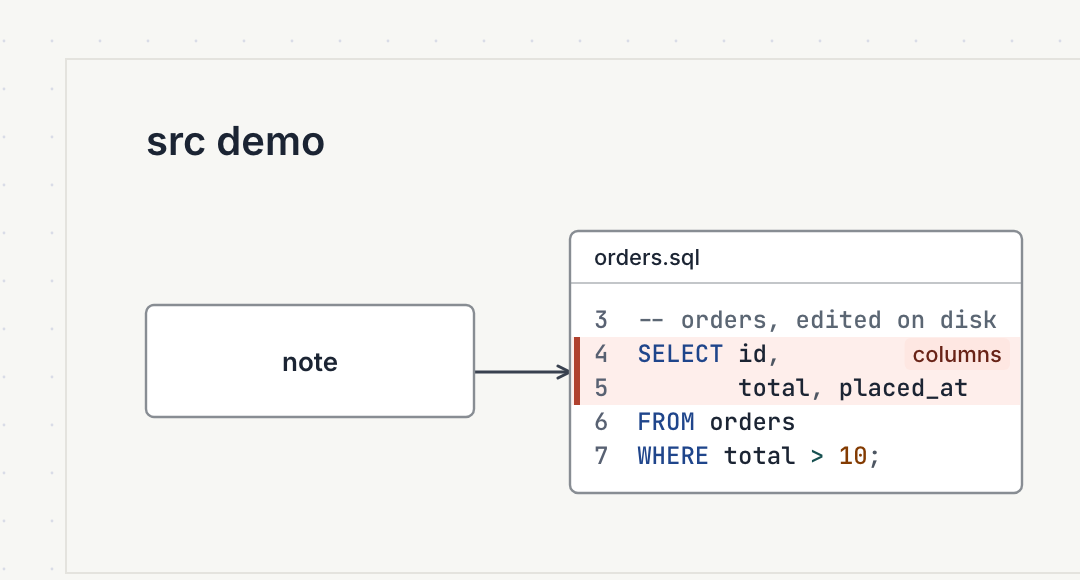 |
That changes what a diagram can be. An agent can draw a diagram that explains a real file, and the diagram follows the file as the code changes. When the code moves out from under a range, check says so: a range past the end of the file, or a match= that no longer hits, is an error.
Exports can't depend on a file that isn't there, so every export inlines the code. A PNG, SVG or PDF embeds the diagram source with each src= swapped for a plain body, plus lang= and start=. You can copy an exported PNG to a folder with no .sql file, and draftably check and draftably extract still read it.
Limits on src=
Reading files from a diagram is a security boundary, so src= has tight rules:
- The path has to stay inside the folder
draftably openserves, or the.draftfile's git root for the CLI. A path that leaves it, or a symbolic link that points out of it, is refused. - A file over 200 KB is refused, and so is anything that isn't a regular file.
- The CLI reads
src=only for a.draftinput. A source embedded in an image never reads files. - The static app, the playground and the bundled examples can't read files at all. There a
src=node draws a placeholder that names the file it needs, andcheckgives a warning.
So untrusted input, like a diagram pasted into the playground, can't use src= to read anything from your disk.
Try it
The Code page in the docs has every option with its default, the rules for line ranges and code from a file, and one table of every check message. The playground draws inline code nodes and ranges in the browser. The code-review example is in the examples list, and examples/code-from-file/ in the repository has the src= example to open with draftably open.
A few rough edges remain. You edit a code body only in the file, not on the canvas. A range label can cover code when no row of the range has room on the right.
Source: byronwall/draftably