---
name: 100x
description: The craft pass that follows `10x`. It takes a UI that is already structurally good and gives it pixel-level care, covering every state and edge case. It inspects each region at high zoom, writes a defect ledger, fixes everything it finds, and proves it with matched before/after screenshots. Use when Byron says `/100x` or `$100x`, asks for "one more order of magnitude", "one last 10x", "professional polish and completeness", or says a UI "still feels sloppy" after a redesign. For a target with no UI (a skill, script, CLI, or workflow), applies the same every-state, every-edge-case pass to the task itself.
argument-hint: "<target: URL, route, component path, or PR> [-- focus areas or constraints]"
user-invocable: true
---

# 100x

Byron runs this in a new thread after `10x`. By now the structure is right. What's left is the gap between "radically better" and "this feels like a professional product." That gap is made of many small things: alignment, rhythm, states, edge cases, copy, and motion. 10x looks at the screen. 100x looks at every square inch of it, in every state.

Don't ask questions. Record judgment calls under "Decisions for you."

## Targets with no UI

If the target has no UI (a skill, a script, a CLI, an API, a doc, a workflow), keep the method and replace the visual mechanics:

- **State matrix:** run it for real on bad inputs as well as good ones. Cover empty, partial, and complete inputs; missing, malformed, and huge inputs; a missing tool or permission; the wrong folder; a second run; and a run inside an unusual environment (another repository, a symlink, a path with spaces).
- **Ledger:** use the same table and severity levels. S1 is a crash, a wrong result, or a change to something the user did not ask to change. S2 is a confusing message, a stack trace in place of a sentence, or output that hides what happened. S3 is wording, ordering, and consistency with the project's other commands or docs. Expect fewer entries than on a screen. A small target can have under 15; don't invent defects to reach a count.
- **Fix:** fix every S1 and S2, and the quick S3s. Keep the scope rule: no new capabilities.
- **Prove it:** for each fixed row, show the command and its output before and after in place of a contact sheet. Add a test only for an S1 that is likely to come back.
- **Deliver:** reply with the ledger counts, the fixes by effect, **Decisions for you**, and **Next**. Skip `byron-ui-taste`, the craft checklist, screenshots, and `compare.html`.

## Inputs

- **Target:** the same as for `10x`.
- **Handoff:** look for `./tmp/10x/<slug>/HANDOFF.md`. If you find it, start from its rough edges and its list of what `100x` should look at, then read its before and after images. If there's none, run `10x` steps 1–2 briefly to ground yourself, but don't restructure.
- **Focus:** optional areas or complaints Byron listed. Fix these first.

## Compose with

Read `byron-ui-taste`, then `../10x/references/repeat-corrections.md` (the `10x` skill's reference file, as a sibling directory path). Also read [references/craft-checklist.md](references/craft-checklist.md). Use `emil-design-eng` for motion and interaction feel. If the project has `impeccable` context, run its `polish` and `audit` playbooks as inputs to the ledger, not as a replacement for it.

## Scope rules

- **Craft, not features.** Don't add new capabilities. The one exception is a small gap that makes the existing flow feel unfinished, such as a missing empty state, keyboard path, copy action, or undo. List any larger idea under "Next" instead of building it.
- **Consistency beats invention.** When the target and the rest of the app disagree, fix the target to match the app's patterns. If the app's own pattern is weak, fix the shared component so every screen improves.
- **No regressions.** Everything the 10x pass made possible must still work.

## Process

### 1. Capture a state matrix

Use realistic data to capture each region of the target in each state that applies:

- **Data:** empty, one item, typical, many (the realistic maximum), long names and values, and missing or null values
- **Interaction:** rest, hover, pressed, focus-visible, selected, disabled, and dragging
- **Lifecycle:** loading, success, error, and stale or refreshing
- **Overlays:** each popover, hover card, menu, dialog, and toast, both open and closed
- **Viewport:** about 1440 px, about 1100 px (the in-between width that usually breaks), about 800 px, the narrow target, and dark mode if the app has it

Save the images to `./tmp/100x/<slug>/`. Use the browser's zoom capture on each region; small defects don't show up in full-page screenshots.

**If you can't view images, fail fast.** When opening a screenshot fails or times out twice in a row (for example "hook did not respond"), stop trying. Each attempt can block for about 10 minutes. Keep capturing the matrix for the PR, but build the ledger from scripted measurements: overflow, overlap, clipping, alignment offsets, contrast, focus rings, and console errors. Mark the ledger "visuals unverified" at the top. Try one more image read just before delivery. If the handoff says the 10x pass was visuals unverified, look at its after images first.

### 2. Write the defect ledger

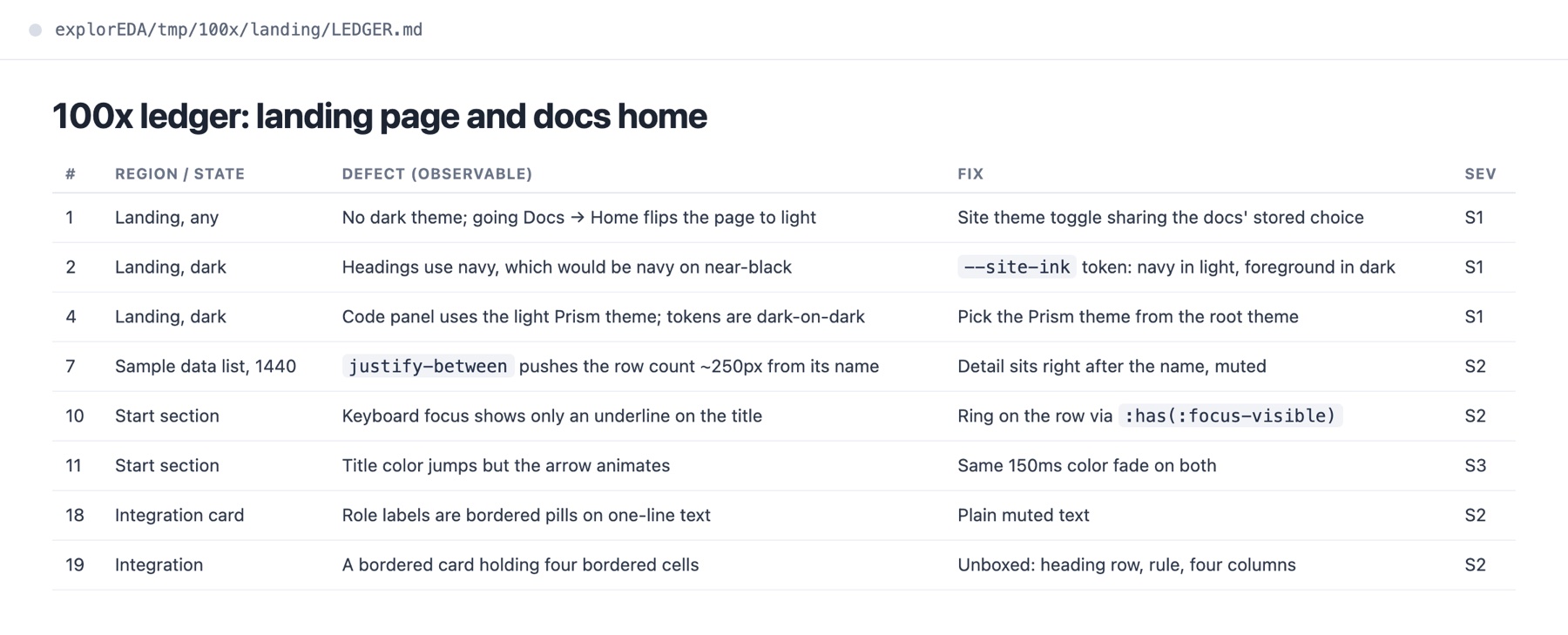
Inspect each zoomed region against [references/craft-checklist.md](references/craft-checklist.md). Write `./tmp/100x/<slug>/LEDGER.md` as a table:

| # | Region / state | Defect (observable) | Fix | Severity |

Severity levels:

- **S1:** broken or confusing behavior
- **S2:** visibly off (misaligned, inconsistent, clipped, or shifting)
- **S3:** a refinement a careful reviewer would notice

Aim for 30 or more entries on a real screen. If you have fewer than 15, you aren't looking closely enough: zoom in further, try more states, and use worse data.

### 3. Fix in batches

Fix every S1 and S2, and every S3 that takes under about 15 minutes. Group the fixes by system rather than by spot, because one fix to a token or component beats ten local overrides. Do it in this order:

1. Tokens and shared components: spacing scale, type scale, colors, radii, icon sizes
2. Layout and alignment: grid lines, baselines, column widths, sticky regions
3. States: hover, focus, loading, empty, and error
4. Copy and number formatting
5. Motion and feel

Mark each ledger row as fixed, deferred with a reason, or rejected with a reason.

### 4. Prove it

- Re-capture the same state matrix. Then build `./tmp/100x/<slug>/compare.html`, a contact sheet with before and after side by side for each region and state.
- Run the project's checks, and the interaction checks from `10x` step 5.
- Do one final full-screen look at 1440 px, as if you were seeing the screen for the first time. If anything there still reads as sloppy, it's an S2. Fix it, then stop.

### 5. Deliver

- Follow Byron's delivery instruction. Attach the most telling before/after pairs to the PR with `gh pr edit --attach`.
- If you didn't view the after screenshots yourself, say the visuals are unverified, the same way as `10x` step 6: in the opening line of the PR body and the first line of your reply.
- Reply with:
  - ledger counts by severity and how many were fixed
  - the five fixes Byron will notice most
  - any system-level changes, such as shared components or tokens that now improve other screens
  - **Decisions for you**
  - **Next:** larger ideas that were out of scope, each worth its own `10x` run