I added table expansion to my Chrome extension because I ran into the kind of small workflow failure that becomes urgent the moment the data matters.
I needed to copy DNS records from a website. The page showed the values in a table, but it did not have a copy button, and the table made text selection awkward enough that I could not trust a manual drag-select. That would have been annoying for any table. It was worse here because one of the records included a long verification string, and DNS is not forgiving when a copied value is missing a character or includes invisible junk.
The extension already let me Alt-click images to open them in a better viewer. The natural next step was to treat tables the same way: Alt-click the thing that is hard to inspect on the page, pull it into a dedicated overlay, and make the useful actions obvious.
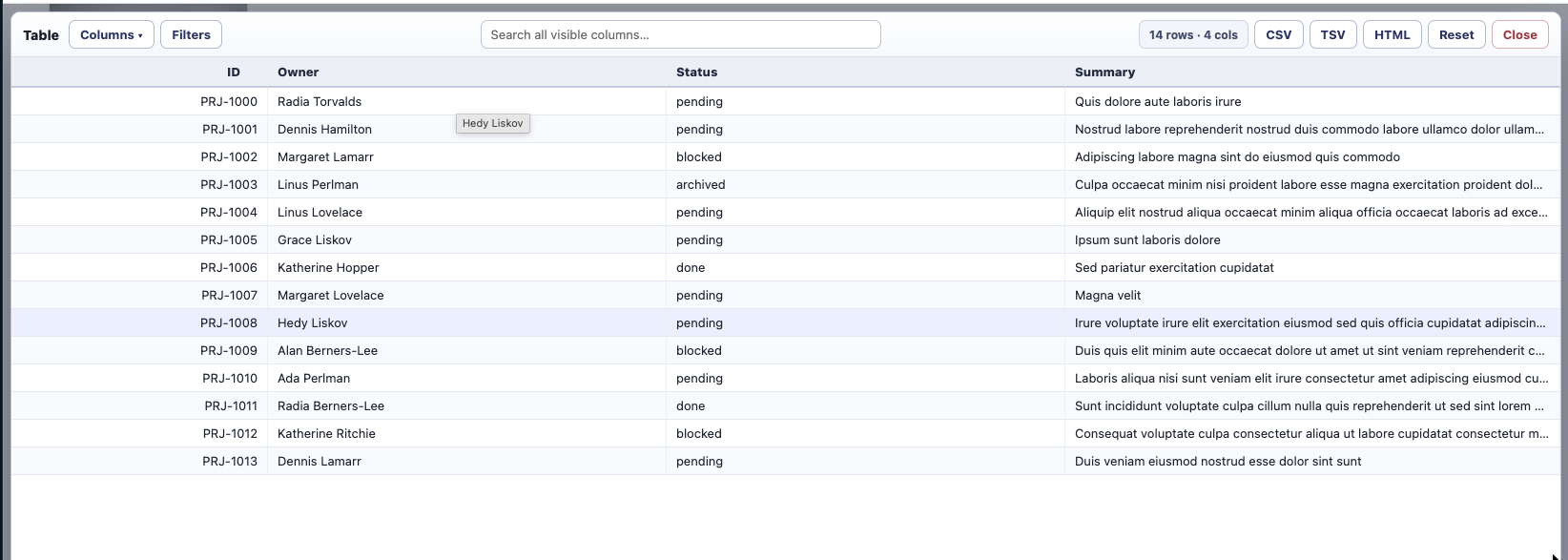
The new viewer opens on real <table> elements, ARIA tables and grids, and CSS display: grid layouts that behave like tables. Once opened, everything is normalized into a common row-and-column model. That means the viewer can offer the same controls no matter how the original page was built.
The first requirement was exact copying. The viewer has CSV, TSV, and HTML copy buttons, and they export the current view rather than the raw source. If I hide columns, reorder them, sort rows, or filter down to the records I need, the copied output matches that visible table state.
The second requirement was making hostile tables calm. I added global search, optional per-column filters, sortable headers, show/hide column controls, column reordering, and resizable columns. For large tables, the on-screen render caps at 5,000 rows to stay responsive, but copy still exports every matching row.
The extraction work was the part that made this more than a modal around innerText. Real HTML tables need rowspan and colspan expansion so copied rows stay rectangular. ARIA grids need role-aware row and cell detection. CSS grids need geometry-based row grouping because their structure is visual rather than semantic.
CSS grids also needed a guardrail. Plenty of pages use grid layout for image galleries and app chrome, not data. The extension now checks whether a grid looks tabular before opening the viewer. If it looks like a gallery, it shows a small override toast instead of hijacking the Alt-click.
This feature is small in spirit: I wanted to copy a DNS value without mistrusting the selection. But the shape of the fix is broader. Webpages often display structured data without giving it structured affordances. Expanding a table into a purpose-built viewer turns that data back into something I can inspect, filter, and copy with confidence.
- Project: Alt Image Zoom Modal
- Source: byronwall/chrome-image-zoom