I wanted the printed schedule from Coach Companion to do one more job. The front already shows who plays each position during every part of the game. When I print it double-sided, though, the back of the page is blank.
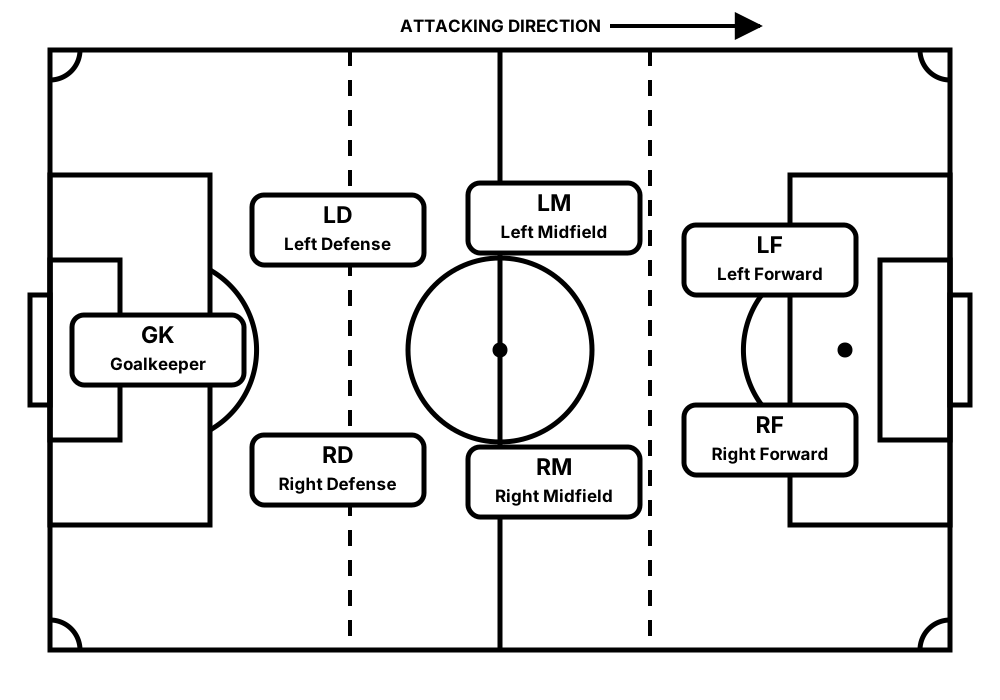
That blank page could be useful on the sideline. Players need to understand where goalkeeper, defense, midfield, and forward positions sit on the field. The build-out lines matter too, because they give us a clear way to describe which area a player should cover.
I brought in a reference image of a youth soccer field and described the output I wanted. That was enough to create a simple black-and-white SVG field inside the application. The position labels are draggable, so I can arrange them on the Positions page instead of changing drawing code. The same saved layout becomes the second page when I print a schedule.
The reference image did not need to become the final artifact. It supplied enough context to build something native to the application: scalable, editable, and connected to the position names already in the schedule.
This was a small change, but it is a good example of how quickly printed artifacts can improve now. A blank back page became a field guide I can hold up during a game and use to show players where they should be.
Source: byronwall/soccer-schedule