I run about 25 small apps on one Linode with Coolify: my family's recipes, my notes app, a Bible reading app, my HN reader, this site, and a pile of experiments. It has 3.9 GB of RAM, and by this week it was swapping 5 GB.
In the old world, I would never have managed this cleanup. The commands are too complex, and the risk of losing data is too high. A wrong docker volume rm or an unchecked "delete volumes" box takes the recipes with it.
This time I asked Claude Code, running Opus 5.5, to audit the server and help retire what I no longer use. It took one evening of messages. Most of mine were "yes, do it" or a choice between options.
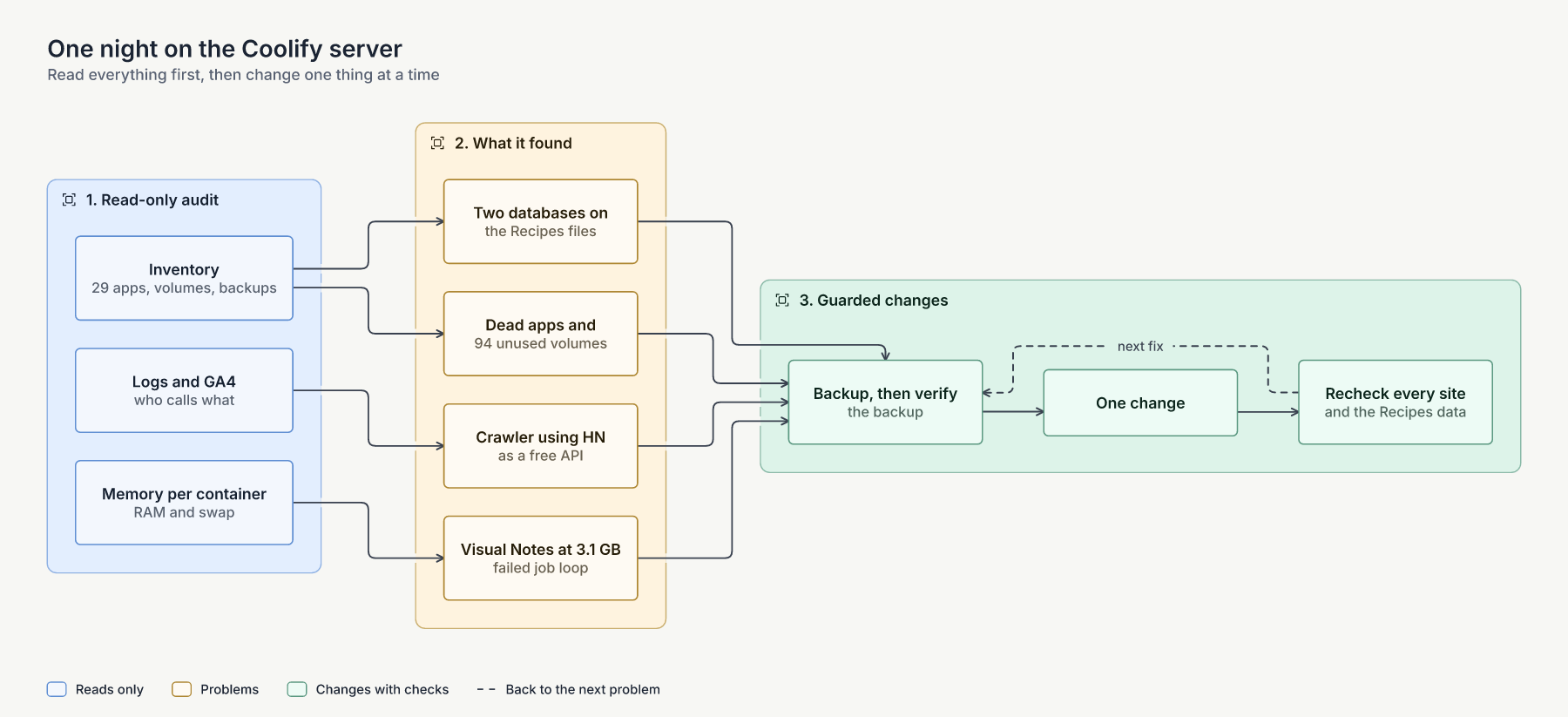
Read first
The first pass changed nothing. Claude listed every container, mapped each one to its Coolify app and domain, counted log lines and database writes per app, read the GA4 numbers from my daily review, and checked which Docker volumes were in the nightly Restic backup. It used plain SSH and read-only SELECTs against the Coolify database.
Two Postgres servers on the recipe data
My Recipes app and an old deploy of another app, retired long ago, both mounted a Docker volume named db-data. Both apps were created before Coolify added a per-app prefix to volume names, so both compose files resolved to the same volume. The old app's web container had exited five weeks earlier, but its Postgres container had kept running since an October reboot. When Recipes redeployed on Nov 19, two Postgres 13 servers had the same data directory open.
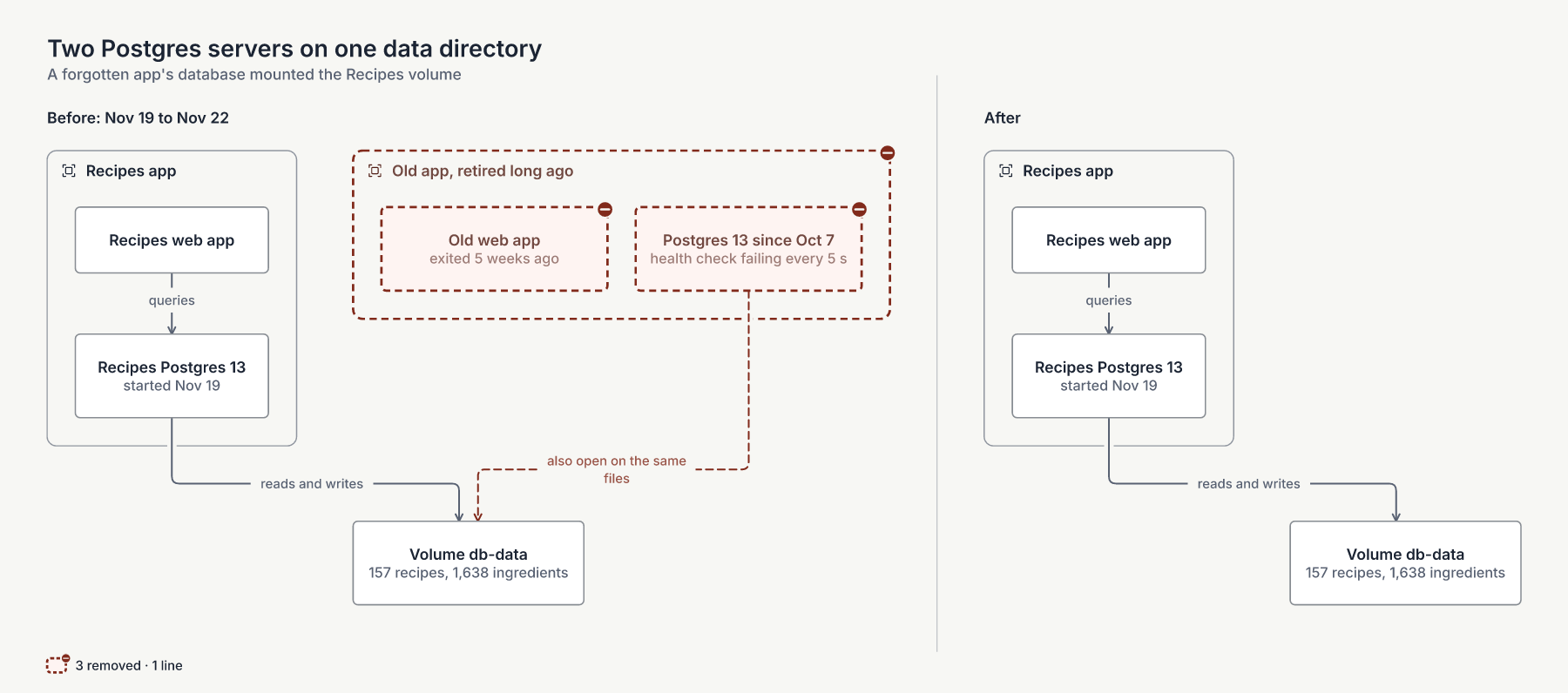
Two servers on one data directory can corrupt it. The Postgres lock file does not help, because each container has its own PID namespace and both servers think they are PID 1.
I told Claude the recipe site is important and to fix it without losing anything. It did not start with the fix. It took a pg_dump, copied it to my Mac, restored it into a scratch database, and compared it to a recovery dump from October 26. The recipes, ingredients and steps hashed the same in both; only meal plans and shopping lists had grown. Then it stopped the old container with SIGKILL, not docker stop. A normal stop makes Postgres write a shutdown checkpoint, which would have written the old server's out-of-date view into the Recipes files. A kill discards it.
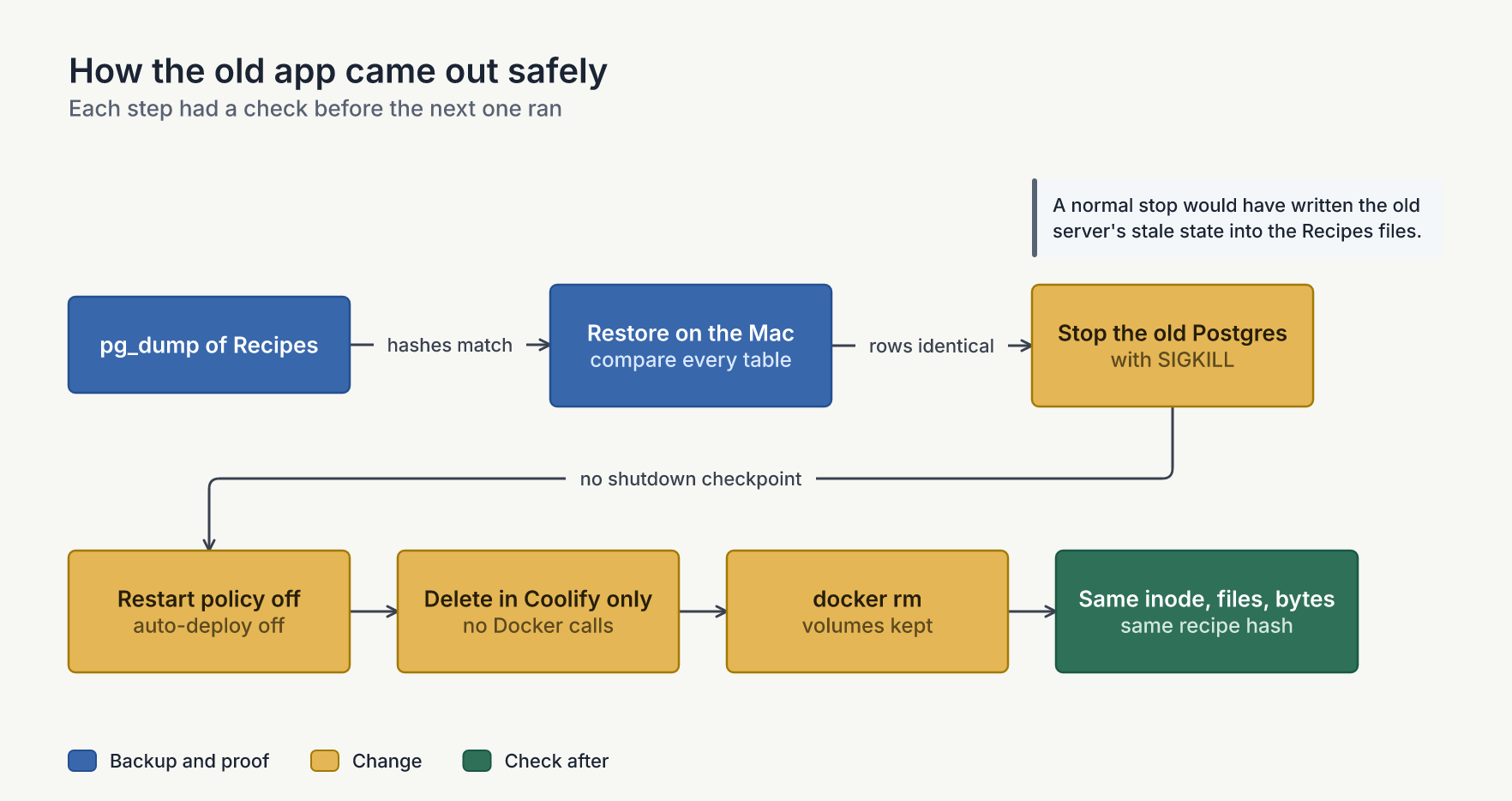
Deleting the old app from Coolify was the next risk. Coolify's delete dialog has a "delete volumes" box, and here the volume belonged to Recipes. I asked Claude to be certain. It read Coolify's own DeleteResourceJob source in the running container, found a delete path that makes no Docker calls at all, and ran that through artisan tinker with every remote flag off and a check on the app name. The containers then came out with a plain docker rm, which never removes a named volume. Afterward the volume had the same inode, the same 1,340 files, the same byte count, and the same hash over all 157 recipes.
Retiring apps and freeing disk
I marked up Claude's list of retirement candidates in my planning viewer: delete this, ignore that server, retire these five apps, leave the rest until I look at them. Claude read the notes and worked through them with the same pattern each time. It dumped and test-restored the one database that had real data, tarred every volume, deleted only the Coolify records, kept the volumes for a week, and rechecked every site.
The volume cleanup was bigger than the inventory suggested. 99 Docker volumes had no container, mostly empty anonymous volumes from old builds. Claude removed 94 of them, after checking that no Coolify app still named each one, that each archive held the same number of files as the volume, and that Restic had a copy. It kept five, including an old volume the Recipes app still referenced by name.
Then the disk. Unused images, an uncapped 4 GB system journal, rotated logs and two old Visual Notes dumps took the disk from 80% used to 49%, with 37 GB free. Claude kept the previous Visual Notes image so I could still roll back that night's deploy.
A crawler using my HN reader as an API
GA4 said my HN reader had 360,000 users a week. Claude broke that down: 342,000 were Chrome on Windows 10 at a 1280×1200 screen, every one a new visitor with no referrer, from data-center cities, each loading a different /story/<id>. Every unknown story made my server fetch the whole comment tree from the HN API.
Claude's first fix stopped serving unknown stories. I still open old story links, so I said no. The fix that shipped in byronwall/hn-offline#125 shows a Load story button for a story the server doesn't have. The crawler runs JavaScript but doesn't click, and any old link still opens with one click.
Where 3 GB of memory went
Visual Notes held about 3.1 GB, mostly in swap. I asked if there was a simple way to see why. Claude sent SIGUSR1 to the Node process to open its inspector inside the container, read process.memoryUsage() over the debugger protocol, and closed the inspector again. The JavaScript heap was 63 MB. The other 3 GB was native memory, in Prisma's query engine and malloc.
It set MALLOC_ARENA_MAX=2 and restarted the app. Memory dropped to 271 MB. Then I opened the notes canvas, and it went straight back to 2 GB.
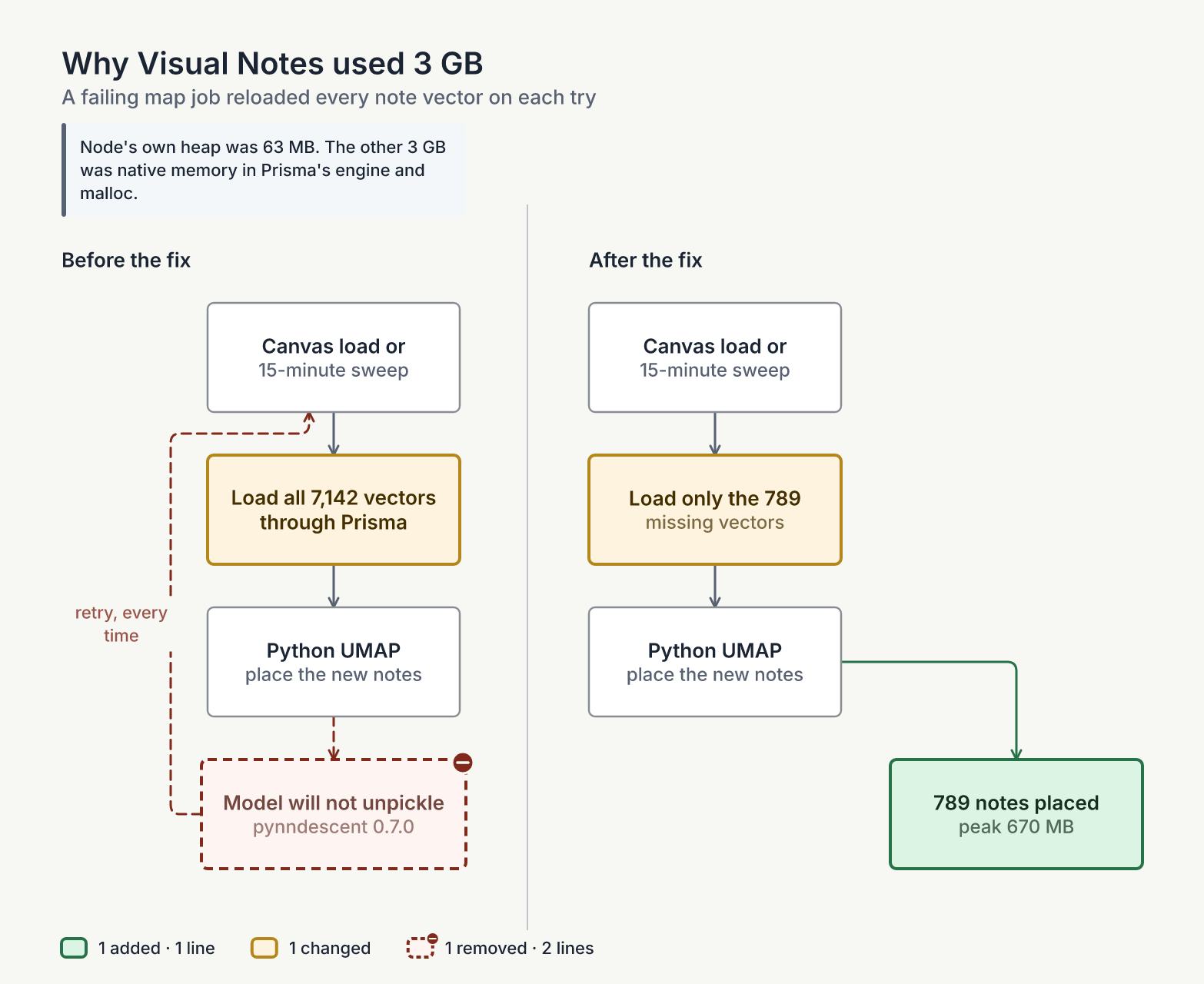
The canvas places new notes on a UMAP map. Each try loaded all 7,142 note vectors, called a Python script, and failed: the saved model no longer unpickled, because the UMAP requirements were unpinned and the image now had pynndescent 0.7.0. The 15-minute sweep did the same. Notes added since late October had never reached the canvas, and every retry inflated memory again. A separate Claude session fixed it in byronwall/visual-notes#360: it pins the stack, backs off after a failure, and loads only the missing vectors. After deploy, all 789 notes landed on the map with a 670 MB peak.
What broke
One thing. To add MALLOC_ARENA_MAX, Claude appended a line to the app's live .env, which had no newline at the end. The line merged into HOST=0.0.0.0, and Visual Notes failed its health check for about three minutes. Claude caught it from the health check, restored the .env from the backup it had taken first, and appended the line properly. The backup and the health check are why it cost three minutes.
What I did
I picked which apps to retire, said which old links I still use, and approved each change. I never typed a Docker or Postgres command. The careful parts came from Claude without asking: the dump and test restore before touching Recipes, the SIGKILL, reading Coolify's source before trusting its delete, the file counts on every archive, and the recheck of every site after each step.
Two things are still open. Both big problems ran for weeks with nothing reporting them, so a separate session audited what the server logs and proposed a small set of alerts for me to pick from. And on Nov 25 I'll check whether Visual Notes' memory stays flat.