The useful question for an inbound form is not whether the submit button works. It is where the record goes after someone clicks it.
I built a small AI project intake with ChatGPT Sites and found that distinction by testing the first deployed version. The first pass looked finished. It had the large monospace type, the cobalt editor aesthetic, a responsive form, legal copy, and a success state. It did not actually save anything.
That made this a better experiment than a clean one-shot success would have been. The workflow went from a loose visual prompt to a deployed site, then from a convincing interface to a real application with durable records and a private inbox.
You can try the public intake here. Do not submit confidential or sensitive information. The admin route is protected and is not part of the public demo.
The platform is ChatGPT Sites, which can create, host, refine, and share a web experience from a prompt or compatible local project. The documentation also makes an important distinction that became central to this build: temporary presentation state is different from product data that people expect the site to remember.
The initial prompt
Here is my exact first prompt:
Create a quick $sites that collects contact info for an "AI project" inbound. Simple name, email, and a question about "what do you want to build with AI". Also include some generic legalese at the bottom about this being a test just to show some legalese. Make it look progammer ish and modern (monotype, large font).
That is not a detailed product spec. It names the fields, the rough visual direction, and the fact that the legal copy is mostly there to demonstrate the shape of the page.
Sites turned that into three visual directions:
- a dark terminal with an acid-lime accent
- a warm blueprint/editor layout with cobalt blue
- a deep navy coding console with cyan and coral accents
My complete design-selection prompt was:
2
That picked the warm blueprint version. The finished page feels like a project_request.json editor: off-white drafting paper, visible rules, black borders, large type, and a hard-shadow blue button.
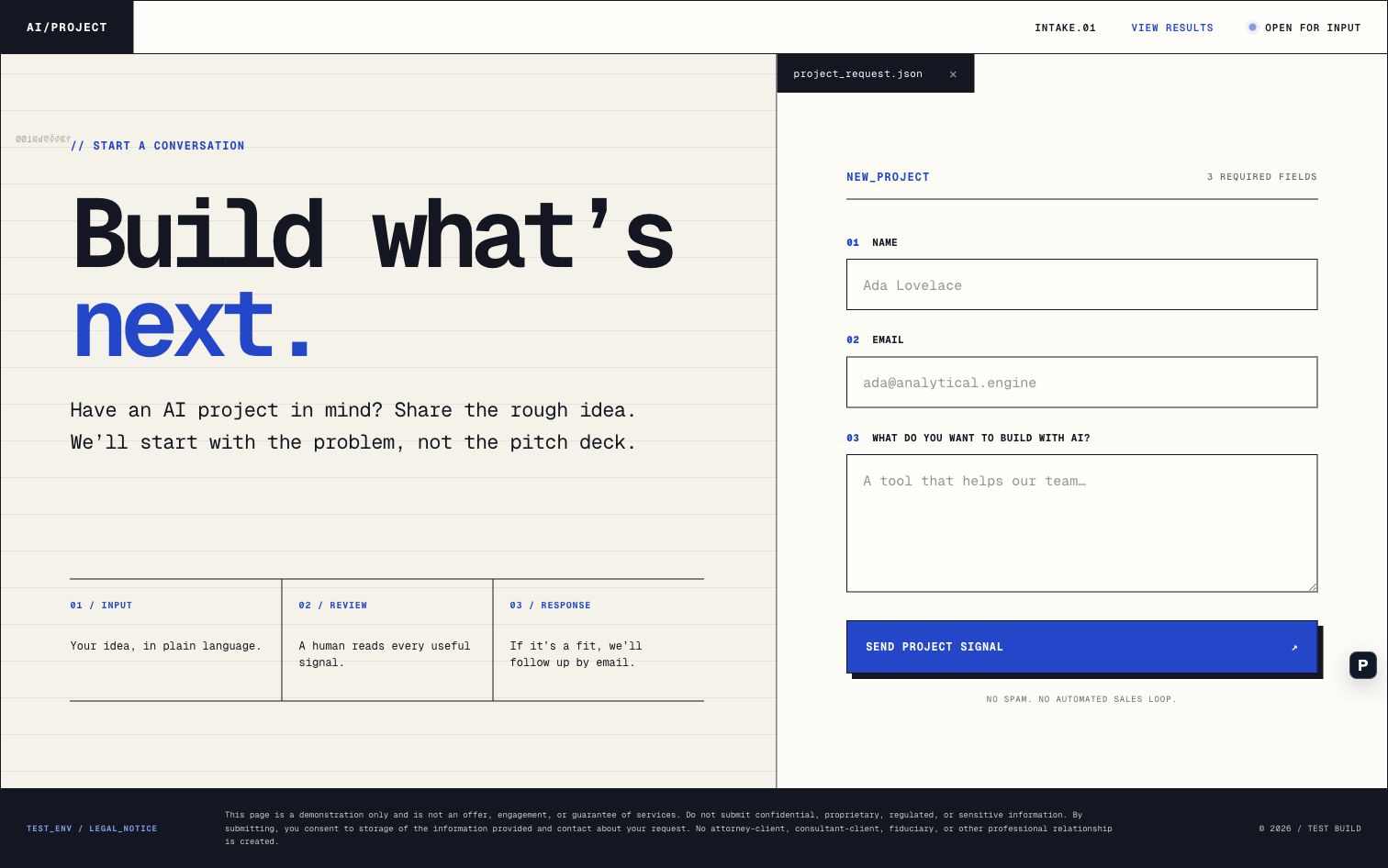
The first deployment was fast. It also contained the main failure in the process.
A success state is not storage
I opened the live site, filled out the form, submitted it, and then asked:
I tested it and submitted it. How do I actually see the results?
The answer was that I could not. The browser had changed to a success state, but the form did not send or save the submission. My test record was gone.
This is exactly the kind of gap that is easy to miss when reviewing generated software visually. Every individual part of the interface appeared to work:
click submit
  -> prevent the browser's default form action
  -> switch local component state
  -> render "Signal received"
What I actually needed was:
click submit
  -> validate the input
  -> write a durable record
  -> attempt the notification
  -> return a real success or failure
  -> show the saved record in a private view
The first flow proves that a React state update works. The second flow creates an inbound system.
The Sites documentation explicitly calls out this review step: if a site collects submissions, confirm where the data goes and who can access it. That is not legal boilerplate. It is a concrete product test.
Turning the form into an inbox
I asked for both a private dashboard and email notifications:
Let's do both of those
The updated site now writes submissions to a D1 relational database. The form waits for the server response and shows an actual error if the write fails. A successful response means a record exists.
The private /admin route reads those records in reverse chronological order. It shows the submission ID, timestamp, notification state, name, email, and project description. The route requires Sign in with ChatGPT and then checks the signed-in email against a server-side admin allowlist.
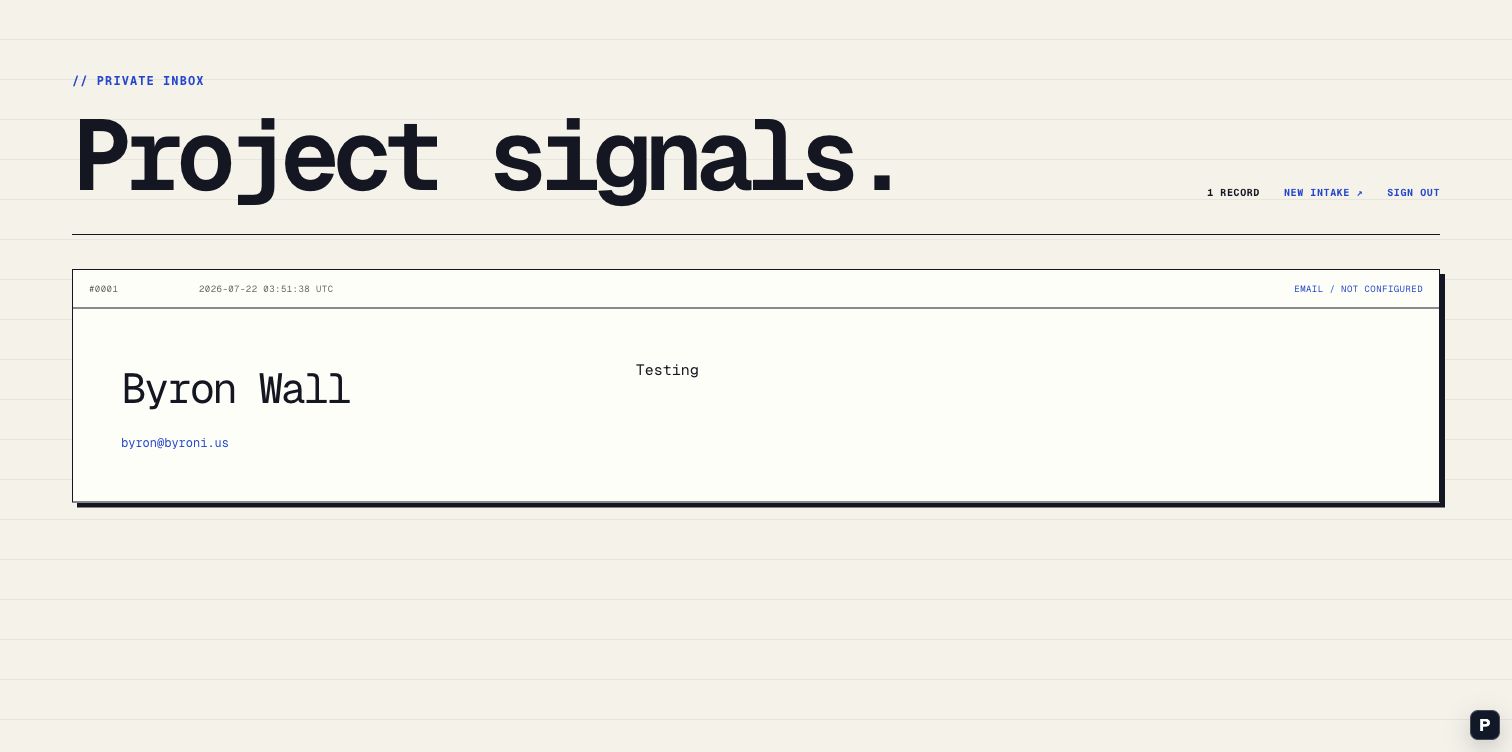
The site is public because an inbound form needs to be reachable. The results are not public. Those are separate access decisions, and keeping them separate makes the system much easier to reason about.
Email delivery is wired through Resend, but the screenshot shows EMAIL / NOT CONFIGURED because the secret was not installed at capture time. That status is useful. The submission still exists, and the dashboard does not pretend the notification was sent. Once the provider key is added as a hosted secret, new records can move to EMAIL / SENT or EMAIL / FAILED without changing the storage path.
What the process actually showed
The interesting part was not that Sites produced a nice form. Generating a polished form is increasingly the easy part.
The useful part was the loop:
prompt
  -> compare visual directions
  -> deploy a real URL
  -> use the site
  -> find the missing behavior
  -> add storage and authorization
  -> expose the operational state
  -> redeploy
The live URL made the product gap obvious. If this had stayed as a local mockup, I might have reviewed the typography and button behavior and called it done. Submitting the production form forced a much better question: where is my data?
There is also a useful lesson in how to prompt Sites. The initial prompt said the form should "collect" contact information, but it did not explicitly say to keep submissions between visits or provide a place to review them. The current Sites guide recommends naming durable storage when the product needs saved records. A stronger first prompt would have included that behavior:
Store every submission durably. Add an owner-only dashboard where I can review the records, and send an email notification for each successful submission. The public form must report a real storage failure instead of showing a fake success state.
That would probably have avoided the missing-data pass. Still, I am glad I found it by using the site. A prompt can specify intent, but the deployed artifact is where you learn whether the system actually preserves it.
Try the non-admin page: AI Project Intake
Reference: ChatGPT Sites documentation